The shift to remote and hybrid work is permanent, turning the digital workspace into the primary office. This new reality demands more than just basic communication apps; it requires a thoughtfully curated set of tools that foster seamless collaboration, maintain productivity, and keep teams connected across time zones. Choosing the right software is no longer a luxury but a critical business decision. A poorly matched tool can lead to communication breakdowns, missed deadlines, and frustrated teams. In this guide, we cut through the noise to analyze the best collaboration tools for remote teams, breaking them down by category so you can build the ideal tech stack for your specific needs.
We'll move beyond generic feature lists to provide a comprehensive analysis of each platform, complete with practical use cases, honest pros and cons, and clear pricing information. You will find direct links and screenshots for every tool, including leaders like Slack, Google Workspace, and Asana, as well as specialized solutions for project management, virtual whiteboarding, and AI-powered meeting summaries. Our goal is to equip you with the insights needed to select software that truly integrates into your workflow.
This curated list covers the essential platforms that form the backbone of successful distributed companies. For those looking to augment their setup, you might want to explore additional top remote team collaboration tools to further enhance your team's workflow. This resource is designed to be your definitive guide, helping you assemble a powerful, cohesive, and efficient digital environment that empowers your team to do their best work from anywhere.
1. Summarize Meeting — Best AI Meeting Tools & Transcription Software 2025
Finding the right AI-powered meeting tool is a critical task for any remote team, and Summarize Meeting's 2025 Comparison Hub is an indispensable resource that streamlines this entire process. Instead of acting as a single tool, it functions as a comprehensive research platform, curating and comparing over 50 different AI transcription and summarization solutions. This makes it one of the best collaboration tools for remote teams looking to make a well-informed decision without spending weeks on manual research.
Why It's Our Featured Choice
What sets Summarize Meeting apart is its dedicated focus on the needs of distributed and asynchronous teams. Its "Async / Distributed Teams" section is a standout feature, evaluating tools specifically on their ability to support remote-first workflows. This is a crucial, often overlooked, criterion in standard comparison guides. The platform provides clear, side-by-side breakdowns of pricing, language support, and key integrations, allowing decision-makers to quickly shortlist vendors that fit their technical and budgetary requirements.
The hub offers detailed profiles on over 20 market leaders like Notta, Fireflies, and Otter.ai, alongside dozens of emerging and niche options. This ensures teams have a complete view of the market, reducing the risk of missing a perfect-fit solution.
Best For:
- IT and Operations managers evaluating AI tools for company-wide deployment.
- Startups and SMBs seeking the most cost-effective transcription solution.
- Global teams that require robust multi-language support.
Access: The platform is a free-to-use online resource.
2. Google Workspace
Google Workspace consolidates core productivity and communication tools into a single, cohesive ecosystem, making it a powerhouse for remote teams that live in the browser. It combines Gmail, Drive, Docs, Sheets, Slides, Calendar, Meet, and Chat into one integrated experience. This tight integration is its key differentiator; you can start a video call from a chat, collaborate on a document directly from an email, and see team availability without ever leaving your calendar.
Its standout feature is the unparalleled real-time, simultaneous co-editing in Docs, Sheets, and Slides. Multiple users can type, comment, and make suggestions in the same document, seeing changes instantly. This fluid, browser-based workflow eliminates the friction of downloading files or worrying about version control, a common pain point for distributed teams.
Key Features & User Experience
Google Workspace excels with a clean, intuitive interface that requires minimal training, especially for those already familiar with Gmail. The user experience is consistent across its web and mobile apps. Built-in AI features, like Smart Compose in Gmail and Docs or formula suggestions in Sheets, subtly boost productivity without being intrusive.
Core Benefits:
- Unified Ecosystem: All tools work together seamlessly, reducing the need to switch between different applications.
- Superior Co-editing: Real-time collaboration is a core function, not an add-on, making it one of the best collaboration tools for remote teams focused on document creation.
- Simple Administration: User management and security controls are straightforward, even for non-IT professionals on lower-tier plans.
Pricing and Limitations
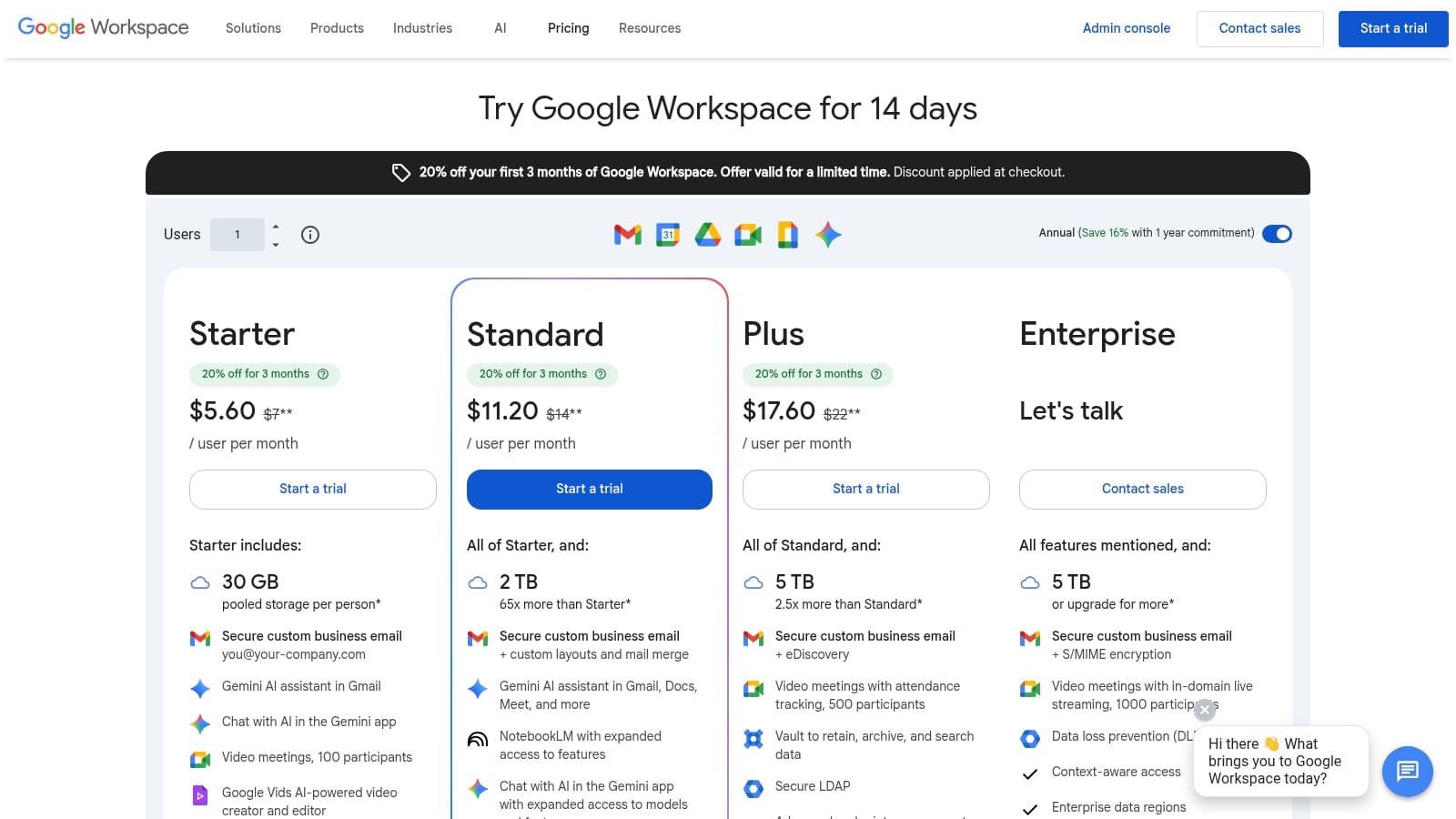
Pricing starts with the Business Starter plan at 6 per user/month, offering 30 GB of pooled storage. The **Business Standard** (12 per user/month) increases storage to 2 TB per user and adds meeting recording.
However, the pooled storage on lower tiers can be a limitation for teams working with large media files. Additionally, more advanced security and compliance features like Data Loss Prevention (DLP) and Vault are reserved for higher-priced enterprise plans.
Website: Google Workspace
3. Microsoft Teams (within Microsoft 365)
Microsoft Teams serves as the central hub for communication and teamwork within the Microsoft 365 ecosystem. It combines persistent channel-based chat, video meetings, file storage, and deep application integration into a single platform. For organizations already invested in Microsoft's suite, Teams is a natural extension, offering seamless co-authoring of Word, Excel, and PowerPoint files directly within the app.
Its key differentiator is the profound integration with SharePoint and OneDrive for file management and Azure Active Directory (now Entra ID) for enterprise-grade security and identity control. This structure provides a robust, governable environment ideal for larger organizations or regulated industries. Features like advanced webinar capabilities, live transcriptions, and optional cloud-based telephony (Teams Phone) make it one of the most comprehensive platforms available.
Key Features & User Experience
The user experience is structured and powerful, though it can present a steeper learning curve for teams not accustomed to the Microsoft environment. Navigation is organized around teams and channels, which helps keep conversations and files contextualized by project or department. The meeting interface is feature-rich, offering together mode, background effects, and breakout rooms.
Core Benefits:
- Deep Microsoft 365 Integration: Unmatched collaboration on Office documents and seamless connection to other Microsoft services.
- Enterprise-Grade Governance: Superior security, compliance, and administration controls are built-in, leveraging the broader Microsoft infrastructure.
- All-in-One Communication: Combines chat, video, and optional enterprise telephony, reducing the need for separate tools.
Pricing and Limitations
Microsoft Teams is included with most Microsoft 365 Business and Enterprise plans, starting with Business Basic at $6 per user/month. For standalone use, a free version is available with limited features.
The primary limitation is its complexity; the licensing matrix with various add-ons for features like Teams Phone and advanced security can be difficult to navigate. For organizations not using the Microsoft stack, the platform can feel heavy and less intuitive compared to more focused alternatives, making it a less ideal choice for teams seeking a simple, standalone chat solution.
Website: Microsoft Teams
4. Slack
Slack has become the de facto digital headquarters for countless remote teams, centralizing communication into organized channels. It moves conversations out of cluttered email inboxes and into a searchable, topic-based messaging platform. Its core strength lies in creating a persistent, transparent hub for both real-time chatter and asynchronous updates, enhanced by features like audio/video huddles, collaborative Canvases, and powerful workflow automation.
The platform's standout feature is its massive integration marketplace, boasting over 2,600 apps. This allows teams to connect tools like Jira, Google Drive, and Asana directly into their chat workflows, creating a unified command center. For remote teams, this means fewer context switches and more time spent on productive work, solidifying its place as one of the best collaboration tools for remote teams focused on communication.
Key Features & User Experience
Slack's user interface is highly intuitive and adoptable, with a minimal learning curve. The experience is defined by robust search, threaded conversations that keep discussions focused, and customizable notifications to manage noise. Recently added AI features on paid plans, like conversation summaries and intelligent search, further enhance productivity by helping users quickly catch up on missed discussions.
Core Benefits:
- Centralized Communication: Organizes all team conversations into dedicated channels, reducing reliance on email and siloed information.
- Extensive Integrations: Connects seamlessly with thousands of other tools, enabling powerful automations and unified workflows.
- Strong User Adoption: The clean, engaging interface makes it easy for new team members to get started and participate immediately.
Pricing and Limitations
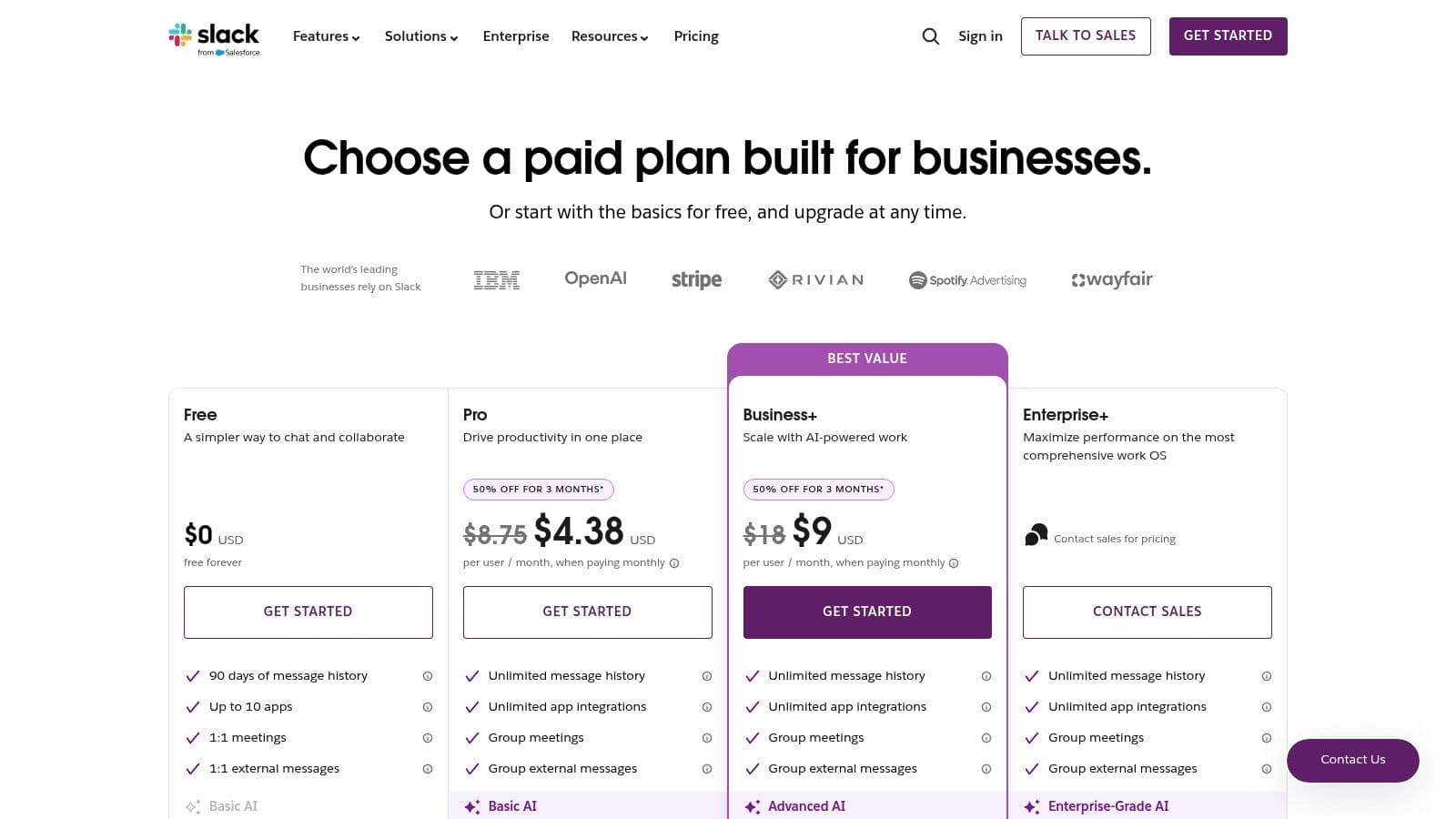
Slack offers a limited Free plan with a 90-day message history. The Pro plan starts at 7.25 per user/month (billed annually) and unlocks unlimited message history, unlimited integrations, and huddles with screen sharing. The **Business+** plan (12.50 per user/month) adds advanced security features like SAML-based SSO and data exports.
A primary limitation is that Slack can become overwhelming and distracting without disciplined channel management and notification settings. Furthermore, essential governance and compliance features, such as data residency and custom retention policies, are reserved for the top-tier Enterprise Grid plan.
Website: Slack
5. Zoom
Zoom became synonymous with video conferencing for a reason: it delivers exceptionally reliable, high-quality video and audio that simply works. For remote teams, this reliability is paramount, removing friction from daily stand-ups, client presentations, and all-hands meetings. Beyond its core meeting functionality, Zoom has expanded into a unified communications platform, offering chat, phone, whiteboard, and advanced webinar solutions, making it a comprehensive hub for real-time interaction.
Its standout feature is the incredibly intuitive user experience, especially for external participants. Joining a meeting requires no lengthy sign-up or software installation, a critical advantage when collaborating with clients or partners. The platform’s depth in meeting controls, like breakout rooms and detailed recording options, also makes it one of the best collaboration tools for remote teams that rely on interactive virtual sessions.
Key Features & User Experience
Zoom’s interface is clean and straightforward, prioritizing core video functions so users can start or join meetings with a single click. Recent additions like the AI Companion (available on eligible paid plans) automate meeting summaries and next steps, significantly boosting productivity. For those seeking to optimize their meeting workflows further, you can explore guides on leveraging Zoom's transcription features.
Core Benefits:
- Frictionless Joining: External guests can easily join meetings without creating an account, making it ideal for client-facing communication.
- Feature Depth: Robust features for webinars, breakout rooms, and polls support everything from simple team check-ins to large-scale virtual events.
- AI-Powered Productivity: The AI Companion helps capture key takeaways and action items automatically, reducing manual note-taking.
Pricing and Limitations
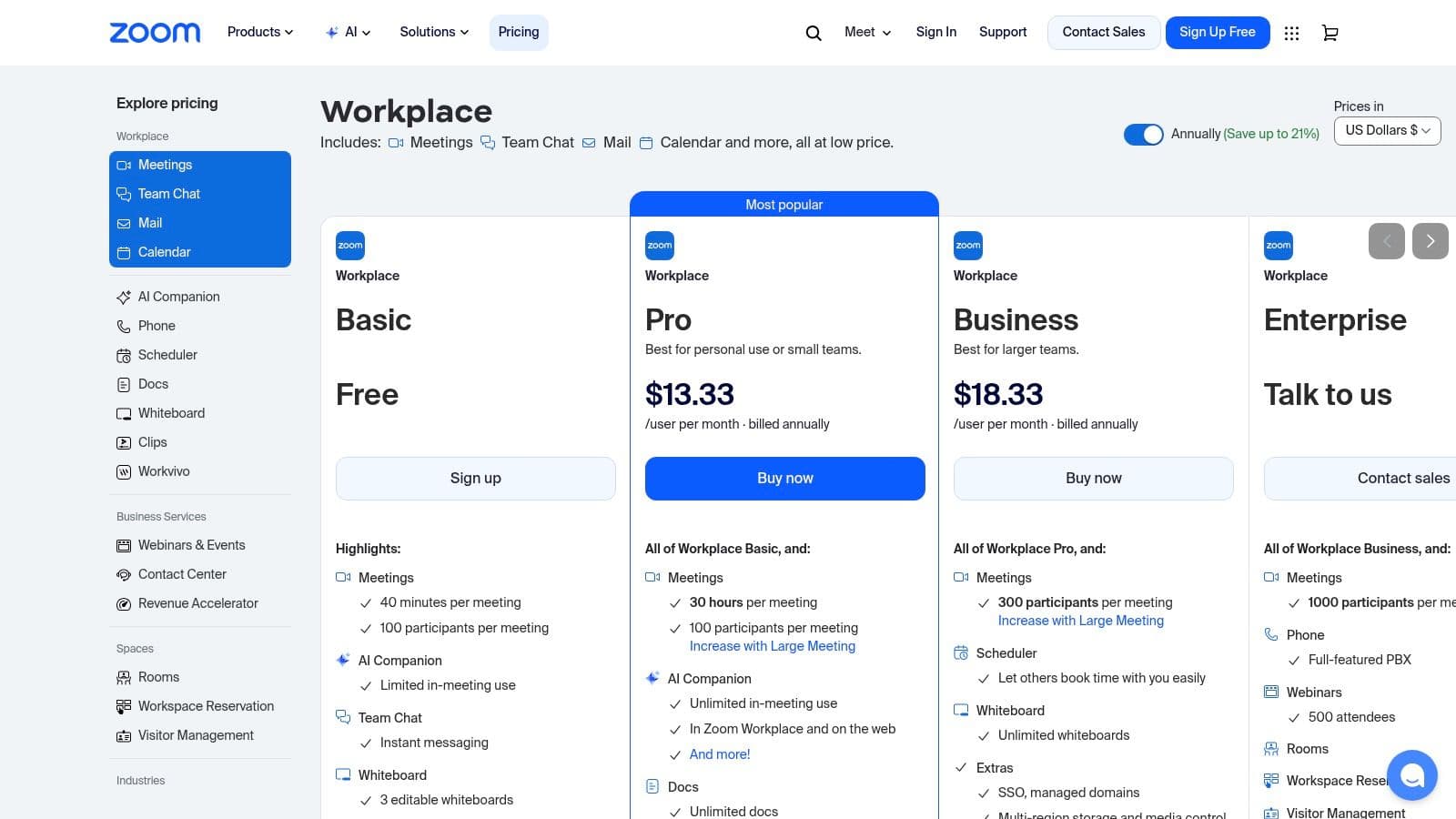
Zoom offers a generous Basic free plan with 40-minute meeting limits. Paid plans start with the Pro tier at 15.99 per user/month, removing time limits and adding cloud recording. The **Business** plan at 19.99 per user/month adds features like company branding and managed domains.
A potential limitation is its pricing structure. The cost can increase quickly as you add products like Zoom Phone or Webinars. The variety of SKUs and add-ons can also be confusing for first-time buyers trying to determine the most cost-effective package for their team's specific needs.
Website: Zoom
6. Notion
Notion serves as a single source of truth for remote teams, blending collaborative documents, wikis, and lightweight project management into one flexible workspace. It replaces scattered docs and disconnected tools by allowing teams to create, share, and manage knowledge, projects, and notes in an interconnected system. The platform’s key strength lies in its modular, block-based editor, which lets users build anything from a simple task list to a complex company-wide knowledge base or project tracker.
Its standout feature is the unparalleled flexibility offered by its database functionality. Teams can create databases for projects, customer feedback, or content calendars and then view that same data as a table, a Kanban board, a calendar, or a timeline. This adaptability makes it one of the best collaboration tools for remote teams needing a central hub for diverse types of information and workflows, from product development to sales operations.
Key Features & User Experience
Notion’s user experience is clean and minimalist, though its powerful flexibility can present a learning curve for new users. The ability to create custom templates and utilize Teamspaces for different departments helps streamline adoption. Its rapidly developing AI features are becoming a core part of the experience, assisting with everything from summarizing meeting notes to drafting content.
Core Benefits:
- All-in-One Workspace: Consolidates docs, wikis, databases, and project pages, reducing context switching.
- Highly Flexible: Customizable databases and page layouts adapt to nearly any team’s workflow (product, sales, HR).
- Centralized Knowledge: Acts as a powerful internal wiki, making information easily accessible for distributed teams.
Pricing and Limitations
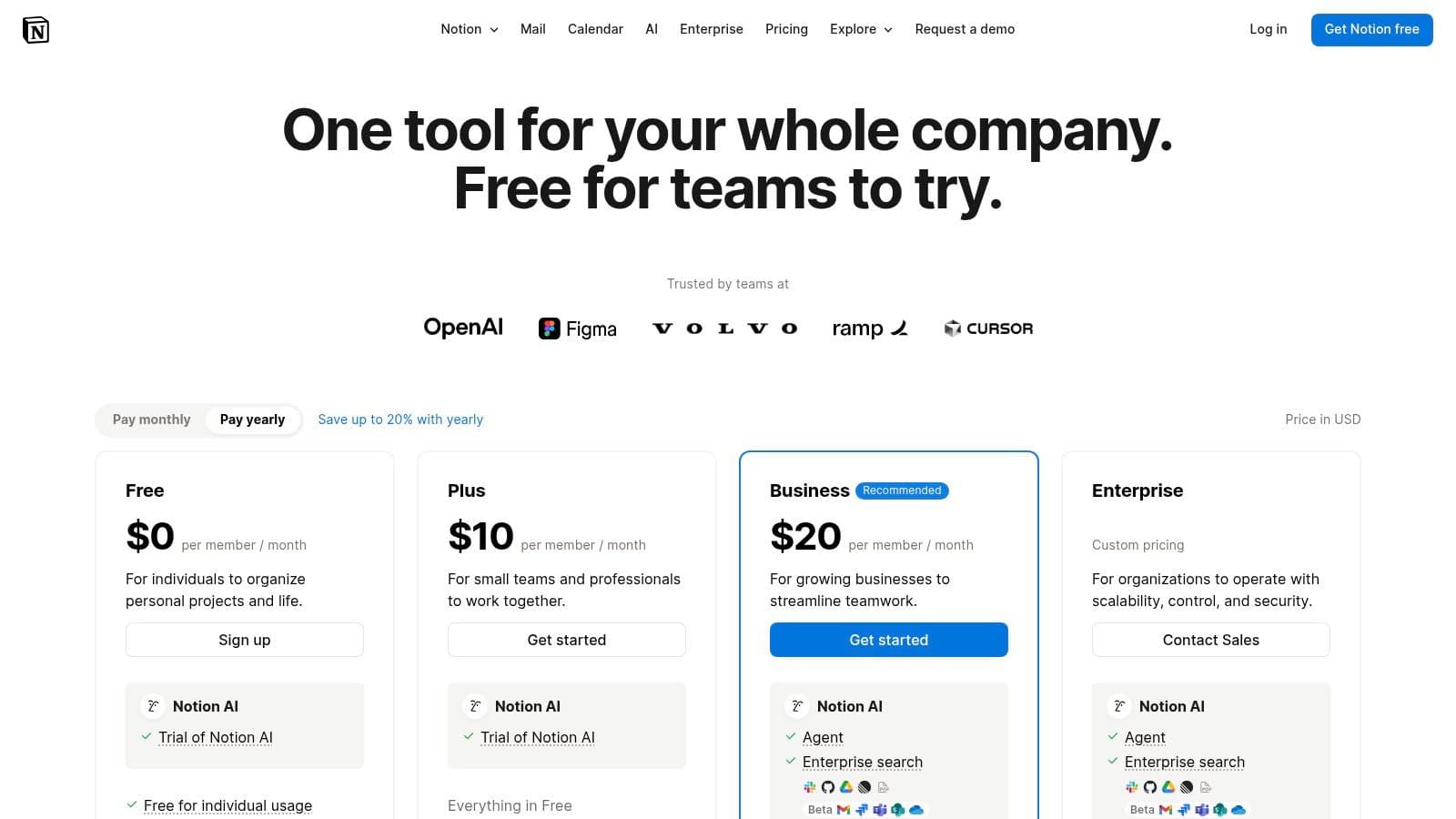
Notion offers a generous Free plan for individuals. Team plans start with the Plus tier at 8 per user/month (billed annually), which adds features like unlimited blocks for teams and a 30-day page history. The **Business** plan (15 per user/month) introduces advanced security controls like SAML SSO.
The platform's main limitation is its potential for disorganization. Without clear governance and structure, workspaces can quickly become cluttered and difficult to navigate. Furthermore, advanced administrative controls and security features are gated behind the more expensive Business and Enterprise plans.
Website: Notion
7. Asana
Asana is a work management platform designed to bring clarity and accountability to team projects, making it indispensable for remote coordination. It moves beyond simple task lists by providing multiple ways to visualize work, including lists, Kanban boards, and timelines that help teams track dependencies and milestones. This structured approach ensures every team member, regardless of their location, knows who is doing what and by when, reducing ambiguity and the need for constant check-in meetings.
Its standout feature is its powerful combination of project visibility and automation. The Workflow Builder allows teams to automate routine tasks, such as assigning work or updating project statuses, which frees up mental energy for more strategic efforts. For remote teams, this means processes are standardized and executed consistently without manual intervention, making Asana one of the best collaboration tools for remote teams that need to orchestrate complex, cross-functional projects.
Key Features & User Experience
Asana offers a clean, visually-driven interface that is easy to navigate after a brief learning period. The ability to switch between views like Timeline (Gantt-style), Boards, and Calendar on the fly allows individuals to work in the format they prefer. Asana AI, available in paid tiers, helps generate project briefs, suggest tasks, and summarize progress, further streamlining workflows.
Core Benefits:
- Clear Ownership: Every task has a clear assignee and due date, establishing accountability across distributed teams.
- Flexible Views: Accommodates different work styles by allowing users to visualize projects in multiple formats.
- Powerful Automation: The Workflow Builder automates repetitive tasks and processes, ensuring consistency and efficiency.
Pricing and Limitations
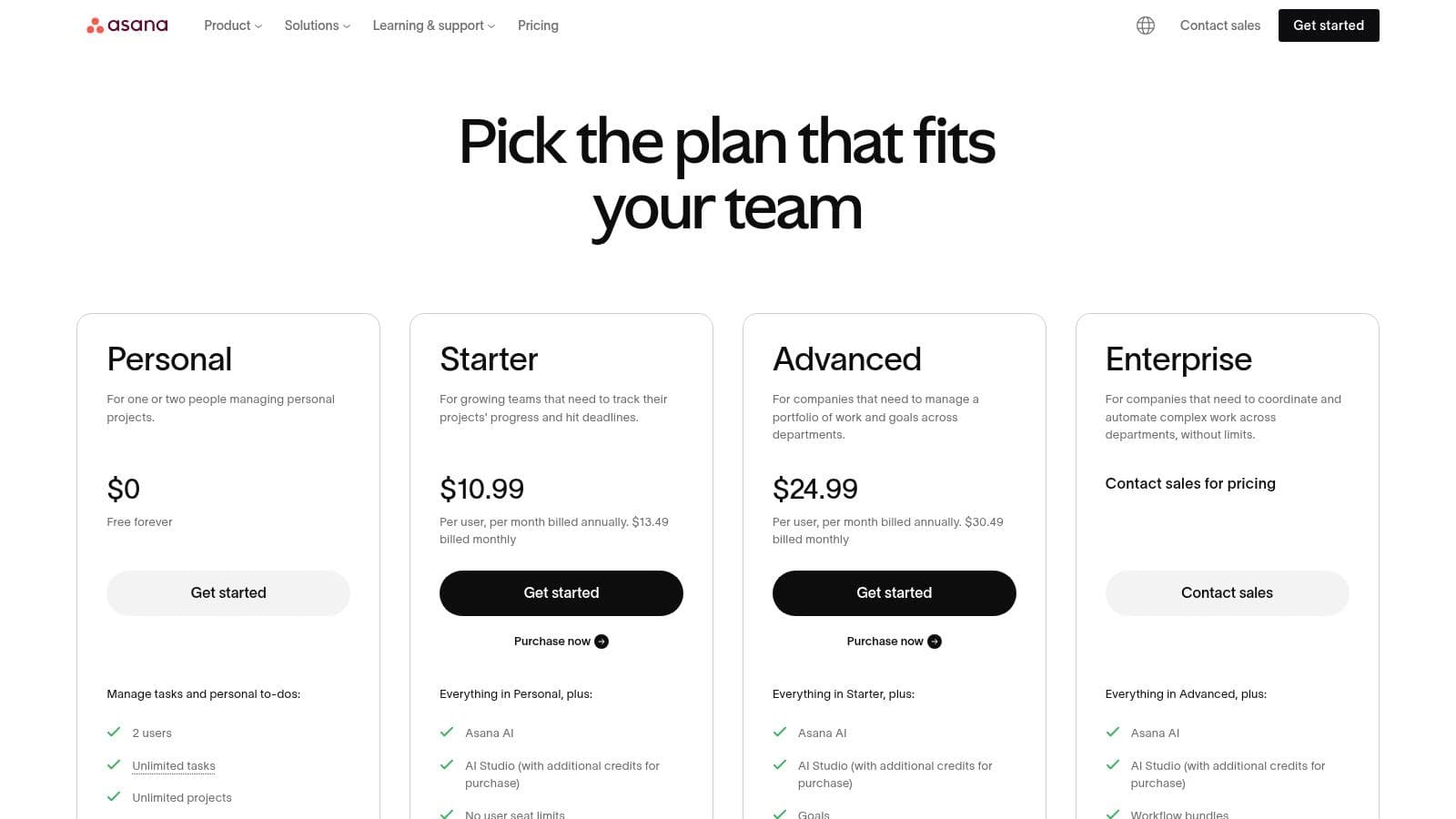
Asana offers a robust Basic free plan for up to 10 team members. Paid plans start with Starter at 10.99 per user/month, which adds features like the Workflow Builder and custom fields. The **Advanced** plan (24.99 per user/month) unlocks portfolios, goals, and more advanced reporting.
A key limitation is that many of its most powerful features, like approvals, portfolios, and goals, are locked behind the higher-priced tiers. Additionally, for very small teams or simple projects, the platform’s extensive capabilities can sometimes feel overly complex compared to simpler to-do list apps.
Website: Asana
8. Trello (Atlassian)
Trello brings the visual simplicity of a Kanban board to project management, making it an exceptionally intuitive tool for tracking tasks and workflows. Its core strength lies in its card-and-board metaphor, where teams move tasks (cards) across different stages (lists) to visualize progress. This low-friction approach makes it ideal for remote teams that need a simple, visual way to manage projects without a steep learning curve.