Picking the best transcription software for interviews really comes down to what you value most: speed, dead-on accuracy, or specific features for your job. For most people, Otter.ai is a fantastic starting point with its generous free plan and live transcription. But if you're a creator who needs to edit audio and video, Descript is a game-changer. And for those projects where every word has to be perfect, nothing beats the human-powered accuracy of Rev.
Choosing Your Ideal Transcription Software
We’ve all been there—staring at hours of interview audio that needs to be turned into text. It’s a classic bottleneck for journalists, researchers, recruiters, and just about anyone who relies on conversations. The right software does more than just type for you; it slots right into your workflow, saving you a ton of time and helping you pull key insights from your recordings.
To find the right fit, you have to look past the flashy marketing and focus on what actually matters for your day-to-day work. This guide will walk you through the crowded options, starting with the most important factors to consider, from accuracy and speaker detection to security and how well it plays with the other tools you use.
Key Evaluation Criteria
Before we jump into the side-by-side comparisons, let's establish what makes a transcription tool genuinely great. I always evaluate them based on these core elements:
- Accuracy and Speaker Diarization: How well does it handle accents, background noise, or industry-specific jargon? And, critically, can it tell who is speaking and when?
- Editing and Usability: Is the editor easy to work with? A good one lets you click on a word and jump straight to that point in the audio, making corrections a breeze.
- Integrations and Workflow: Does it connect with the tools you already live in, like Zoom, Google Meet, or your applicant tracking system (ATS)?
- Security and Compliance: Your interviews can contain sensitive information. The software needs to have solid encryption and meet compliance standards like SOC 2 or GDPR.
The demand for these tools is exploding. The global AI transcription market is already valued at 4.5 billion** and is expected to hit a staggering **19.2 billion by 2034. This just shows how quickly everyone is moving away from manual transcription.
To give you a head start, here's a quick look at my top picks.

Top Interview Transcription Software At a Glance
This table gives you a quick snapshot of the best tools out there and who they’re built for. Think of it as your cheat sheet before we dive into the details.
| Software | Best For | Key Feature | Starting Price |
|---|---|---|---|
| Otter.ai | Real-Time Transcription & Notes | Live transcription and automated summaries for meetings. | Free Plan Available |
| Rev | Unmatched Accuracy | 99% accuracy guarantee with human-powered transcription. | $1.50 / minute (Human) |
| Descript | Podcasters & Video Creators | All-in-one audio/video editing via the transcript text. | Free Plan Available |
| Fireflies.ai | Sales Teams & Enterprise | AI-powered conversation intelligence and CRM integrations. | Free Plan Available |
Ultimately, the right choice really hinges on your specific situation. If you’re still not sure what features you should prioritize, take our short quiz to get a personalized recommendation. With this foundation, you'll be ready to make the best choice as we explore each tool in more detail.
What Really Matters in Interview Transcription Software?
When you're trying to find the best transcription software for interviews, you quickly realize they aren't all the same. It's not just about turning audio into text. A truly great tool has to be built for conversation, handling all the messy, overlapping, and unpredictable parts of a real interview. It’s about more than just word-for-word accuracy; it’s about making the transcript genuinely useful and saving you time.
The most obvious feature is, of course, transcription accuracy. But don't just look at the percentage a service claims on its website. The real test is how it holds up against real-world audio—the kind with background coffee shop noise, thick accents, and people talking over each other. If a tool can't handle that, it's just creating more cleanup work for you down the line.
Many of the most powerful transcription services are now recognized as some of the top AI productivity tools available. This AI is what drives the essential features that separate a basic text converter from a truly professional-grade tool.

Speaker Diarization Is a Must-Have
For interviews, speaker diarization—knowing who said what—is absolutely critical. Without it, you’re left with a giant, confusing wall of text that’s nearly impossible to follow. It’s a non-negotiable feature.
Just imagine trying to pull insights from a user research session or a job interview when you can't tell the difference between the interviewer's questions and the candidate's answers. The transcript becomes almost worthless for analysis, quoting, or sharing with your team.
For journalists, researchers, or anyone in legal professions, this is a deal-breaker. Correctly attributing quotes is everything. When you’re testing different tools, pay close attention to how well they separate speakers, especially when more than two people are talking.
Interactive Transcripts and Timestamps
Forget static text files. The best modern platforms give you interactive transcripts where every word is synced to the audio. This feature alone is a massive time-saver.
Instead of endlessly scrubbing through an audio timeline to find one specific comment, you just click a word in the transcript, and the playback instantly jumps to that exact spot. It makes reviewing and editing feel fast and natural.
Here's how it makes your life easier:
- Quick Verification: Hear something that sounds off? Just click the word to listen to the original audio and fix it in seconds.
- Clip Creation: Highlight a block of text to instantly create a shareable audio or video clip. This is perfect for pulling out key quotes for a presentation or sharing a specific moment with a colleague.
- Precise Referencing: With timestamps attached to every word or paragraph, you can easily cite specific parts of the interview in your reports, articles, or notes.
The In-App Editor Experience
Let's be realistic: no automated transcription is ever 100% perfect. Even at 95% accuracy, there will be misheard names, industry jargon, or mumbled words that need a quick fix. A well-designed in-app editor is the difference between a five-minute touch-up and a soul-crushing hour of corrections.
A good editor should always include:
- Playback Speed Controls: The ability to slow down the audio is a lifesaver when you're trying to decipher a fast-talker or a noisy recording.
- Global Search and Replace: If a name or company is misspelled consistently, you can fix every instance at once.
- Collaboration Tools: The best platforms let you invite teammates to comment or edit a transcript directly, which is great for group projects.
When you combine a powerful editor with accurate speaker labels and interactive timestamps, you get the complete package. These core features are what turn a simple transcript into a dynamic asset for research and analysis. To see how this all comes together, check out what modern meeting transcription capabilities can do for your workflow.
Comparing the Leading Transcription Tools
When you're picking a transcription tool, you have to look past the flashy feature lists and see how it actually performs in the wild. Real-world interviews are messy—full of background noise, people talking over each other, and industry-specific jargon. That's the true test that separates the good from the great.
Let's dive past the generic pros and cons and really get into how top contenders like Otter.ai, Rev, Descript, and Fireflies.ai handle the nitty-gritty of transcribing interviews. The goal here is to give you a clear sense of where each one shines and where it might let you down.
The Accuracy Gauntlet: Clear vs. Complex Audio
Accuracy is the bedrock of any useful transcript, but it's not a single, fixed number. A tool that claims 95% accuracy on a perfect, studio-quality recording can easily stumble when faced with a spotty video call or a conversation in a noisy coffee shop.
- For Crystal-Clear Audio: If you're working with high-quality recordings, tools like Otter.ai and Descript are fantastic. They can get incredibly close to human accuracy, catching common words and names with very few mistakes. This makes them a solid choice for structured interviews recorded with decent microphones.
- For Challenging Audio: This is where the real differences emerge. When you throw in heavy accents, multiple speakers interrupting each other, or a lot of background chatter, automated services start to struggle. This is precisely why Rev's human transcription service is still so valuable—it guarantees 99% accuracy no matter how messy the audio gets.
The AI is getting better, fast. The U.S. transcription market recently hit a massive $30.42 billion, and the software side of things is driving that growth. Professionals need tools that can produce a highly accurate transcript from a client call or strategy session with minimal manual cleanup. If you want to dig into the numbers, you can find some great insights on transcription software statistics that show this trend.
Speaker Identification: A Critical Differentiator
A transcript without clear speaker labels is basically a useless wall of text. For any interview—whether you're a journalist, a researcher, or a recruiter—knowing who said what is absolutely essential. This feature, known as speaker diarization, is handled very differently across platforms.
Otter.ai and Fireflies.ai are built for this, especially in a meeting context. They automatically try to identify and tag speakers, often by syncing with your calendar invites or after you "train" them with a voice sample. It works pretty well for organized conversations but can get tripped up if voices sound similar or people talk at once.
Descript, on the other hand, puts you in the driver's seat. You assign speakers to text blocks right inside the editor. It's a more hands-on approach, but it gives you pinpoint accuracy, which is crucial for creative work like podcasts where attribution has to be perfect.
To give you a clearer picture, let's break down how these top tools stack up on the features that matter most for interviews.
Feature Deep Dive: Otter vs. Rev vs. Descript
Here’s a head-to-head look at how Otter.ai, Rev, and Descript compare on key transcription functionalities. This table cuts through the marketing noise to show you where each tool's real strengths lie for different interview scenarios.
| Feature | Otter.ai | Rev (Automated) | Descript |
|---|---|---|---|
| Best For | Live meetings, team collaboration, academic interviews. | Quick, accurate drafts from clear audio. | Podcasters, video editors, content creators. |
| Accuracy (Clear Audio) | Excellent (~95%). Strong on common vocabulary and names. | Very good (~90%). Reliably captures standard dialogue. | Excellent (~95%). Highly accurate and great with filler word detection. |
| Accuracy (Complex Audio) | Struggles with heavy accents, noise, and crosstalk. | Performance degrades noticeably. Flags low-confidence words. | Also struggles, but the editing interface makes corrections easier. |
| Speaker Identification | Automated, learns voices over time. Good for recurring meetings. | Automated but basic. Often requires manual labeling and cleanup. | Manual assignment in-editor. Slower setup but 100% accurate once done. |
| Editing Experience | Interactive editor with playback sync, highlighting, and comments. | Simple, clean editor focused on proofreading and export. | Revolutionary "edit-text-to-edit-audio/video" workflow. Unmatched for speed. |
| Key Differentiator | OtterPilot for live meeting summaries and action items. | Access to 99% accurate human transcription service as an upgrade. | Overdub (AI voice cloning) and seamless audio/video editing. |
This comparison shows there's no single "best" tool—it's all about matching the tool's core strengths to your specific workflow.
Editing Experience: From Raw Text to Polished Transcript
No AI is flawless, which means a good, intuitive editor is non-negotiable. You can lose all the time you saved with automation if you have to wrestle with a clunky interface just to fix a few typos.
This comparison of Notta and Fireflies touches on how different platforms design their editing and review process. While both offer transcription, one might be built for generating AI summaries while the other is focused on deep integrations with other tools.
- Descript's "Word Processor" Approach: Descript is truly in a class of its own here. It treats your audio and video like a simple text document. If you delete a word from the transcript, it automatically cuts the corresponding audio or video clip. This makes cleaning up mistakes, filler words, and long tangents unbelievably fast. It’s a complete game-changer for anyone producing podcasts or video content.
- Otter.ai's Interactive Editor: Otter provides a more classic but very effective editor. You can click on any word to jump to that point in the audio, make corrections on the fly, highlight important sections, and leave comments. Its real-time collaboration features are also top-notch, letting teams work together on the same transcript.
- Rev's Polished Delivery: When you use Rev's human service, you get a nearly perfect transcript from the start, so you won't be doing much editing. Their editor is clean and simple, built for a quick final review before you export. The editor for their automated service is more like Otter's and helpfully highlights words the AI was unsure about, so you know exactly where to check.
Workflow Integrations: Connecting to Your Tools
A great transcription tool can't be a dead end. It needs to plug right into the other software you rely on every day, creating a smooth workflow from the moment you hit record.
Fireflies.ai really excels here, especially for business and sales teams. It connects directly with a huge range of platforms:
- Video Conferencing: Zoom, Google Meet, Microsoft Teams
- CRMs: Salesforce, HubSpot
- Collaboration Hubs: Slack, Asana
This means your sales call can be automatically recorded, transcribed, summarized, and then logged in your CRM without you lifting a finger. The AI can even pull out action items and send them over to your project management app.
Otter.ai also has solid integrations with Zoom and other meeting platforms, making it a favorite for general business use and academic researchers. Descript leans more into creative workflows, with integrations for video editing software and podcast hosts. And for developers, Rev offers a powerful API to build custom connections.
In the end, the right tool comes down to what you do every day. A journalist has completely different needs than a sales manager, and the best software will reflect that. By weighing these tools based on accuracy, speaker labeling, editing, and integrations, you can find the one that truly makes your work easier.
Making Sure Your Tool is Secure and Fits Your Workflow
Great transcription is about more than just accurate words. The best software also needs to be rock-solid secure and plug right into the tools you already use. This is especially true if you’re in HR, law, or healthcare, where keeping interview data confidential isn't just a good idea—it's a requirement.
Think about it. When an interview contains personal details, company secrets, or sensitive client feedback, you have to trust the platform handling that data. That’s where security certifications come into play.
What to Look for in Security
When you’re digging into a tool's security, you'll see a lot of acronyms thrown around, like SOC 2, GDPR, and HIPAA. These aren't just for show; they signal that a company has passed serious, independent audits of how they handle your data.
- SOC 2: This is the big one for software companies. It proves a provider manages data securely to protect your privacy and interests.
- GDPR: If you deal with anyone in the European Union, the General Data Protection Regulation sets the standard for handling their personal data.
- HIPAA: This is non-negotiable for anyone in healthcare. The Health Insurance Portability and Accountability Act is the law for protecting patient information.
Taking a moment for understanding what SOC 2 compliance entails can really help you see how seriously a provider takes protecting your information. A company that invests in these certifications is showing you they’re committed to security. You can also get a deeper dive by reading our guide on whether AI meeting tools are secure and compliant.
Ultimately, choosing a compliant tool means your data is encrypted and access is tightly controlled. It’s about peace of mind.
Getting More Done with Smart Integrations
A great transcription tool shouldn't live on an island. To really get your money's worth, it needs to talk to the other apps you use every day. This is how you automate the boring stuff and stop wasting time copying and pasting.
The best transcription software for interviews offers native integrations that create a smooth path from conversation to action. That means less busywork and more time to focus on what actually matters.
Integrations That Make a Real Difference
Look for connections that match up with how you work:
- Video Conferencing: Direct links to Zoom, Microsoft Teams, and Google Meet are huge. They let you automatically record and transcribe interviews without ever having to download or upload a file.
- CRMs and ATS: This is a game-changer for sales teams and recruiters. Imagine your interview notes and action items automatically appearing in the right record in Salesforce, HubSpot, or Greenhouse.
- Collaboration Hubs: Being able to push key clips, summaries, or to-do items from an interview directly into Slack or Asana keeps your whole team on the same page without having to jump between apps.
For example, a UX researcher could set it up so that transcribed user feedback from a Zoom call posts directly to a team Slack channel. A sales manager could have every mention of a competitor automatically logged in Salesforce. This is what turns a simple transcription tool into a true productivity booster, saving you hours of tedious data entry.
Matching the Right Tool to Your Profession
There's no single "best" transcription software for interviews. A journalist on a tight deadline has completely different needs than a UX researcher mining for customer insights. The right choice always comes down to your specific job and the workflow you rely on every day.
Choosing the right tool isn't just about finding the highest accuracy score. It's about finding the features that solve your biggest headaches. For instance, a recruiter is going to be focused on top-notch security and how well the tool plays with their Applicant Tracking System (ATS). A podcaster, on the other hand, just wants the best editing experience to get that final audio perfect.
To help you get started, this decision tree can quickly point you in the right direction based on a couple of core needs: confidentiality and team collaboration.
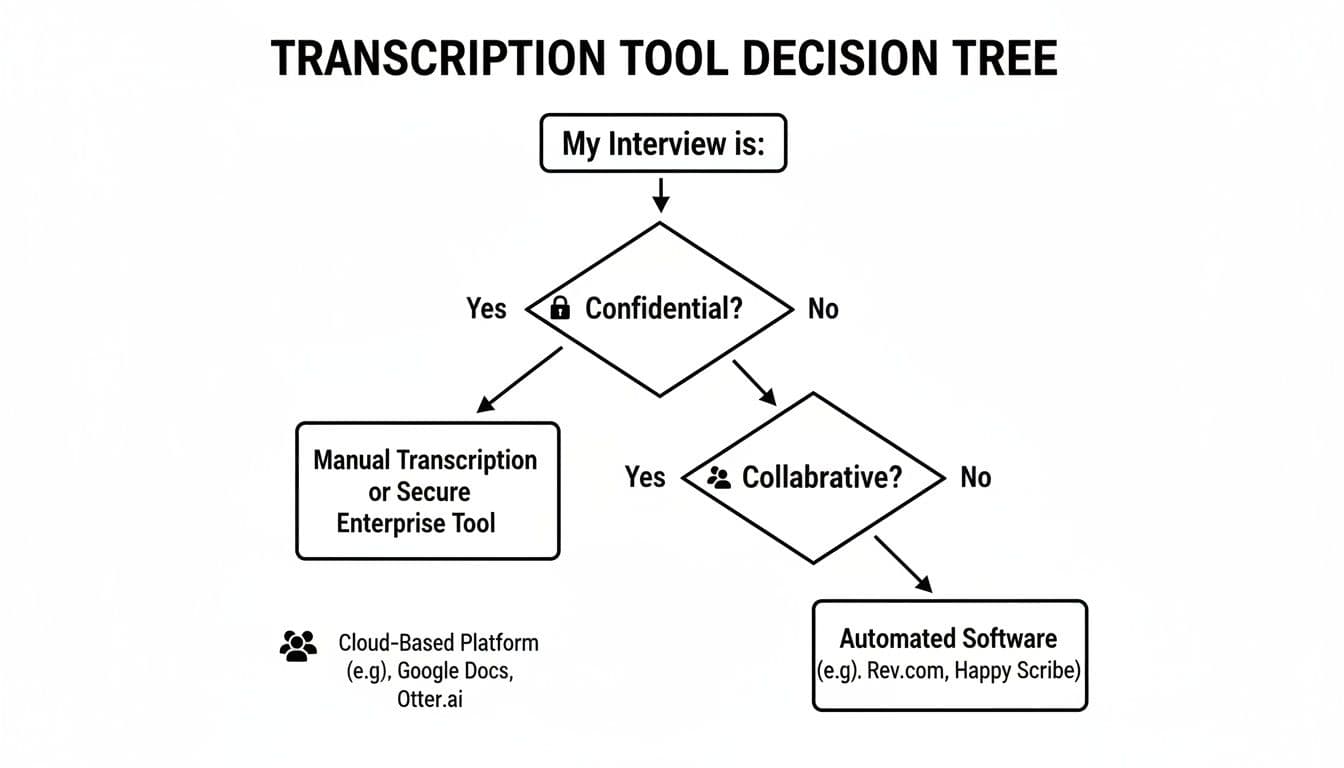
As you can see, if security is your non-negotiable, you’re immediately pushed toward enterprise-level tools. If sharing and working together on transcripts is the priority, you'll want something built for team workflows. Let's dig into these recommendations for different professions.