At its core, sales call analysis software uses AI to automatically record, transcribe, and analyze every conversation your sales team has, whether on a call or a video meeting. But it's so much more than a simple recording tool. This technology actually listens, identifying key topics, tracking who's talking and for how long, and even flagging mentions of your competitors.
This gives revenue teams a clear, data-backed view of what's really happening on the front lines. Every conversation is no longer just a one-off interaction; it becomes a strategic asset you can learn from.
What Does This Software Actually Do?
By moving away from manually listening to a handful of calls, sales leaders can finally see what their top performers are doing differently. You can spot the winning behaviors, build a playbook around them, and deliver coaching that’s specific and targeted, not generic. It’s like having a coach and a strategist listening to every single call, catching patterns that even the most experienced manager would miss.
These platforms dig into conversations to pull out crucial business intelligence. The main functions usually boil down to these four things:
- Automated Transcription: Turns all your calls into searchable text.
- Keyword and Topic Spotting: Automatically flags mentions of competitors, products, pricing, or any other term you care about.
- Performance Metrics: Tracks things like talk-to-listen ratios, longest monologues, and how many questions your reps are asking.
- Sentiment Analysis: Gauges the mood of the call—for both your rep and the prospect—to get a better read on the health of a deal.
The AI Engine Behind It All
Modern sales call analysis software relies on some pretty advanced tech to process and understand these conversations, making it a key part of broader AI-powered telephony solutions. This AI-driven analysis is the heart of what the industry calls conversation intelligence. If you're new to the term, you can learn more about what is conversation intelligence and see how it works under the hood.
A Rapidly Growing Market
The proof is in the numbers. The conversation intelligence market was valued at a staggering 23.4 billion** in 2024 and is on track to hit **60.3 billion by 2036. This explosive growth shows just how much businesses are leaning on data-driven sales strategies. You can dig into more market trends on futuremarketinsights.com.
It's clear that companies aren't just recording calls for compliance anymore. They're actively mining them for a competitive edge, making these platforms a non-negotiable part of the modern sales tech stack.
Diving Into the Core Features of Top Tools
Choosing the right sales call analysis software can feel a lot like comparing high-performance engines. They all promise power, but the real difference is in the details—how they work under pressure and what’s actually going on under the hood. While most platforms will tell you they offer recording and transcription, their true value comes from how well their core features actually perform.
A platform’s ability to give you real, game-changing insights comes down to the quality of its foundational technology. This is where we need to look past a simple feature list and really dig into what drives better sales performance.
The whole analysis process boils down to three key stages, as this diagram illustrates.
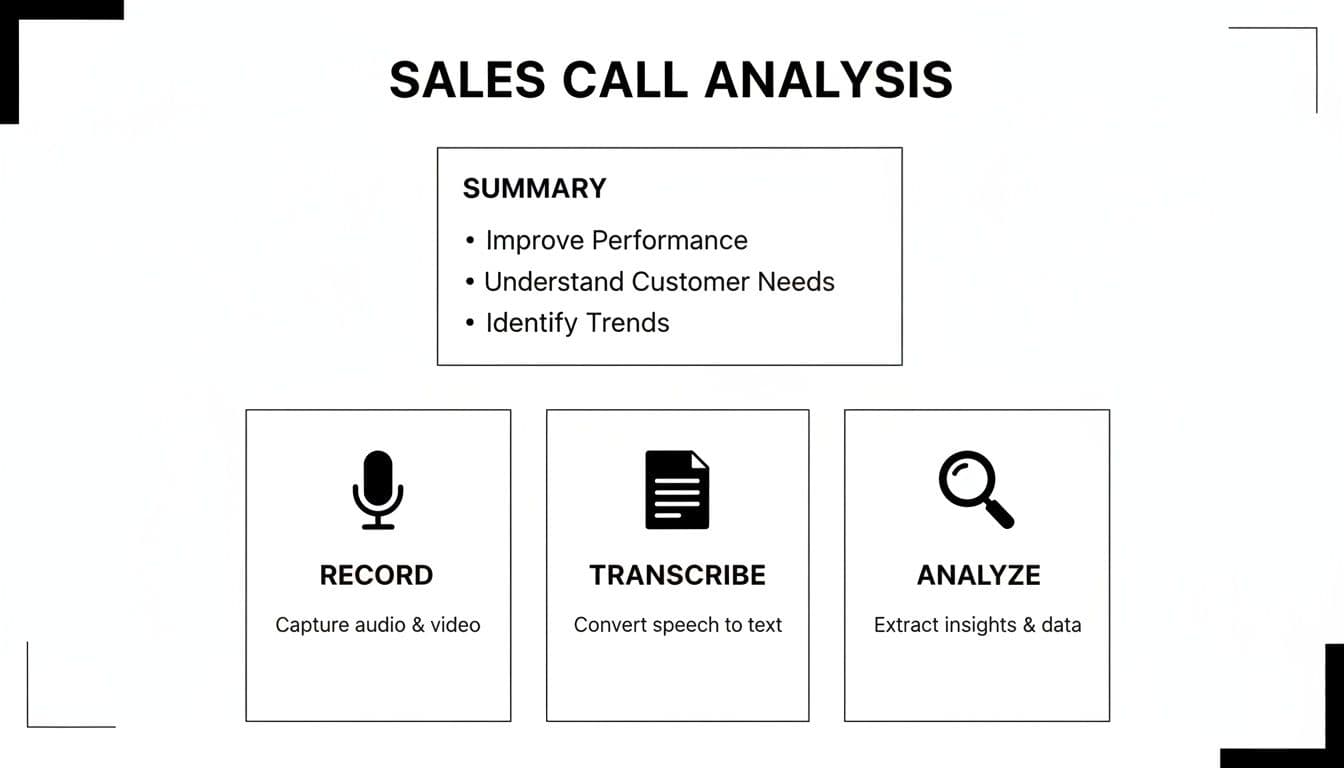
This workflow shows how a raw conversation gets captured and is then turned into strategic intelligence—which is the entire point of using one of these tools in the first place.
H3: Transcription Accuracy and Speaker Identification
The absolute bedrock of any good sales call analysis platform is its transcription engine. If the transcript is wrong, every piece of analysis that follows will be flawed, leading to bad insights and even worse coaching. The best tools use sophisticated AI to get near-human levels of accuracy, even when dealing with heavy industry jargon, strong accents, or people talking over each other.
But not all transcription is created equal. Some tools are fantastic with North American accents but fall apart when your team is global. My advice? Always test a platform with your own call recordings during the demo, especially the ones you know are tough to understand.
Speaker identification is another make-or-break feature. Basic tools might just label people as "Speaker 1" and "Speaker 2," which makes it impossible to get a true read on talk-listen ratios. The more advanced platforms automatically assign names by syncing with your calendar, ensuring every metric is tied to the right person.
While your main goal is sales analysis, it pays to understand the technology powering it. Many of these platforms are built on leading AI-powered transcription software tools that are marvels of engineering on their own. Knowing this helps you appreciate what's required to deliver high-quality insights.
H3: Talk-Listen Metrics and Engagement Analytics
Once you have an accurate transcript with correctly identified speakers, the software can start breaking down the conversation dynamics. The most famous metric is the talk-to-listen ratio, which simply shows how much a rep talks versus how much they listen. It's no surprise that top-performing reps often have a more balanced ratio, typically around 43:57, showing they let the customer do most of the talking.
But the best tools go much deeper than just one simple ratio. They provide engagement metrics that tell a much richer story:
- Longest Monologue: This flags when a rep drones on for too long without a break—a dead giveaway that they're pitching, not conversing.
- Patience: This measures the length of the pause before a rep jumps in to respond, showing if they’re actually letting the customer finish their thought.
- Interactivity: This tracks the back-and-forth rhythm of a conversation, giving you a tangible sense of how engaged the prospect really is.
These metrics turn a manager's gut feeling into cold, hard data. You can stop saying, "You need to listen more," and start providing specific, actionable feedback like, "On your last three calls, your monologue time went over two minutes. Let's work on asking more open-ended questions to break that up."
H3: Topic and Keyword Tracking
One of the most powerful things these platforms can do is automatically track specific topics and keywords across thousands of calls. This is where you move from analyzing individual conversations to spotting massive, market-wide trends.
Most platforms let you set up "trackers" for terms you care about. For instance, you could track:
- Competitor Mentions: Get an instant alert every time a competitor like Salesforce or HubSpot comes up.
- Pricing Objections: Flag every single conversation where someone says "too expensive," "budget," or "discount."
- Feature Requests: Stay ahead of the curve by identifying what new features your customers are asking for.
- Buying Signals: Pinpoint phrases like "next steps," "timeline," or "send over the proposal" to get a real feel for deal momentum.
The sophistication here really varies. Basic tools are just doing simple keyword spotting. The more advanced platforms use natural language processing (NLP) to actually understand the context. They know the difference between a customer asking about your pricing and objecting to it, which gives you much cleaner, more reliable data.
H3: Surfacing Actionable Coaching Insights
At the end of the day, you're analyzing calls to make your team better. The best software doesn't just dump a bunch of data on your lap; it highlights coachable moments and helps managers scale their feedback effectively. This is where the top platforms truly separate themselves from the pack.
To make sense of the different options, I've put together a quick comparison of the core features you'll find in the market leaders. This should help you see how they stack up at a glance.
Feature Matrix of Leading Sales Call Analysis Software
| Feature | Tool A (e.g., Gong) | Tool B (e.g., Chorus.ai) | Tool C (e.g., Salesloft) | Key Differentiator |
|---|---|---|---|---|
| Transcription Accuracy | Best-in-Class | Advanced | Advanced | Gong often leads with accuracy for complex jargon and accents. |
| Talk-Listen Metrics | Best-in-Class | Best-in-Class | Advanced | Both Gong and Chorus offer deep interactivity and monologue tracking. |
| Topic & Keyword Tracking | Best-in-Class | Advanced | Advanced | Gong’s contextual understanding (NLP) is a step ahead of simple keyword spotting. |
| Sentiment Analysis | Advanced | Advanced | Basic | Most tools offer it, but the nuance varies. Look for emotion vs. just positive/negative. |
| Coaching Insights | Best-in-Class | Best-in-Class | Advanced | Salesloft integrates coaching directly into its broader sales engagement platform. |
| CRM Integration | Best-in-Class | Best-in-Class | Best-in-Class | All top tools have deep, seamless integration with Salesforce and others. |
As you can see, while the top-tier tools share many advanced capabilities, the "best-in-class" ratings often point to a deeper, more refined execution of a feature. Your choice really depends on what you value most—whether it’s pinpoint transcription accuracy or how well the tool fits into your existing coaching workflow. The key is to find a platform that enhances what you already do, rather than forcing you into a brand-new process.
How Different Teams Drive Performance with Call Analysis
The real magic of sales call analysis software isn't found in a single dashboard. It's in how it helps different people across the sales organization get better at their jobs. Think of it as a multi-tool where every team finds a unique way to turn raw conversation data into concrete actions that actually move the needle.
This flexibility is why we're seeing such a huge uptake. The sales and lead management part of the contact center software world is booming. The overall market hit a staggering $49.64 billion in 2025, but it's the sales segment that’s really taking off, projected to grow at a compound annual rate of 12.90%. This isn't just a trend; it's a clear signal that sales teams are leaning on this tech to get ahead. You can dig into the numbers yourself with market research by Precedence Research.
But this growth isn't just about big-picture economics. It’s happening because of the real, everyday wins it delivers for everyone from the front-line reps to the VPs of Sales.
Use Cases for Sales Managers
For any sales manager, the biggest headache is finding the time to coach effectively. You can't be on every call, but you need to know what's happening. Call analysis software acts like a force multiplier, letting you find those critical coaching moments without having to listen to hours of recordings.
Instead of offering generic advice like "be more confident," a manager can jump to the exact minute a rep fumbled a pricing question or completely missed a prospect's buying signal. They can leave a time-stamped comment right there on the transcript, making the feedback specific, relevant, and much more likely to stick.
It also completely changes how you onboard new hires. Imagine giving a new rep a curated playlist of your team's "greatest hits"—calls that perfectly show how your top performers run a discovery, handle objections, and close. You're not just telling them what to do; you're showing them.
Here's how managers put it to work:
- Building a "Game Tape" Library: Create playlists of winning calls for new hire training and ongoing skill development.
- Data-Driven 1-on-1s: Walk into coaching sessions armed with specific examples and metrics, not just a gut feeling.
- Smarter Pipeline Reviews: You can actually listen to the key calls in a deal to validate a rep's forecast. Does the prospect sound genuinely interested or are they just being polite?
Use Cases for Revenue Operations
The RevOps team is the backbone of the sales org—they manage the processes, the data, and the tech stack. For them, sales call analysis software is a source of truth that helps keep the entire engine running smoothly.
A classic RevOps nightmare is messy CRM data. Reps get busy, forget to log calls, or jot down half-baked notes, and suddenly your pipeline is a work of fiction. This software can automate call logging and use AI to create concise summaries, making sure your CRM is always filled with rich, accurate information. To see how this fits into the bigger picture, it helps to understand what is revenue intelligence and its core concepts.
Beyond data hygiene, RevOps can use conversation insights to refine the sales playbook. By analyzing thousands of calls, they can see which talk tracks and messaging actually connect with buyers and which ones are falling flat. This isn't guesswork; it's data.
Top applications for RevOps include:
- Validating CRM Data: Auto-sync call recordings and AI summaries so that what’s in the CRM reflects reality.
- Improving Forecast Accuracy: Add a qualitative layer to the pipeline by analyzing conversations for real buying intent and hidden red flags.
- Optimizing Sales Playbooks: Use real-world call data to codify what your best reps are saying and doing to win.
Use Cases for Individual Sales Reps
For reps on the front lines, the biggest win is self-improvement. Instead of waiting for their manager's weekly feedback, a rep can proactively review their own calls to see what's working and what isn't. They can hear for themselves when they talked too much or missed a cue from the prospect.
This puts reps in the driver's seat of their own development. They can study the calls of the team's top closer to learn exactly how they navigate tricky negotiations or handle that one objection everyone struggles with.
How individual reps use it:
- Self-Coaching: Review their own call recordings to spot their own strengths and weaknesses without waiting for a 1-on-1.
- Mastering Objection Handling: Search the team's call library to find proven examples of how to overcome tough objections.
- Perfecting Pitch Delivery: Listen back to their own tone, pacing, and word choice to sound more polished and persuasive.
By delivering clear value to each role, sales call analysis software stops being just another tool. It becomes a core part of how a modern sales team operates, learns, and ultimately wins.
What It Costs and How It Connects: Pricing and Integrations
When you’re looking at sales call analysis software, it’s easy to get wowed by the features. But let's get real for a second. Two questions matter more than anything else: What's this really going to cost us? And will it actually play nice with the tools our team lives in every day?
Get either of those wrong, and you're looking at a pricey piece of shelfware. The right tool has to fit your budget and your workflow, not just have a cool-looking dashboard.
Deconstructing Pricing Models
The sticker price for these tools is almost never the full story. Most vendors mix and match different fees, and if you only look at the per-user cost, you’re going to be in for a surprise. It’s a classic mistake that can blow up your budget.
To figure out the true cost, you have to break down their pricing structure. You'll almost always see two main components:
- Per-Seat Licenses: This is the base cost for every person who needs access—reps, managers, you name it. Expect to pay somewhere between 1,200 to 1,600 per user, per year. This is usually billed annually.
- Platform Fees: On top of the per-seat cost, many of the bigger players like Gong tack on a separate platform fee. This can start around $5,000 a year and covers the core tech and support.
These two numbers give you your baseline. But always dig deeper. Ask about sneaky add-on costs for things like extra AI features, specialized dialers, or advanced analytics that might not be included in the standard package.
Why Seamless Integrations Are Non-Negotiable
Want to guarantee your new software fails? Force your reps to jump back and forth between different apps all day. A tool that doesn’t plug directly into your existing tech stack is just creating more work, and your team will drop it in a heartbeat.
The best platforms don't just "connect" to your CRM—they have a deep, two-way sync that makes both systems smarter. Think about how the data needs to move. Does the tool pull deal info from Salesforce to give context to a call? Even better, does it push AI-generated summaries and action items back into the CRM, right where your reps are already working?
You need to see deep integrations with the big three pillars of your sales tech stack:
- CRM: Whether you use Salesforce, HubSpot, or Pipedrive, the connection has to be solid. It should automatically sync contacts, accounts, and deal stages without anyone lifting a finger.
- Video Conferencing: Look for native connections with Zoom, Google Meet, and Microsoft Teams so recording calls is completely effortless.
- Collaboration Tools: An integration with Slack or Teams is huge. It lets managers instantly share a snippet from a call for a quick bit of coaching, right in the channel where the team is already talking.
Don't Overlook Security and Compliance
You're about to hand over recordings of sensitive customer conversations, so you have to be able to trust the vendor. With 65% of enterprises saying conversation intelligence is critical for staying compliant, this is one area where you can't afford to cut corners.
Start with the basics: ask about data encryption, both when the data is moving and when it's sitting on their servers. They should be using top-tier encryption to protect your calls. You'll also want to see granular access controls, so you can decide exactly who gets to see, hear, or share specific recordings.
If you do business in Europe, GDPR compliance is a must. Some platforms, like Modjo, were built with a "GDPR-first" approach and host data within the EU. For those in the U.S., state-by-state rules on two-party consent can be a headache. The best tools have automated consent prompts or announcements built right in, so your reps don't have to think about it. The platform should make compliance automatic, not just another manual task on your reps' to-do list.