We’ve all been there—staring at a to-do list that feels more like a novel. But what if the secret wasn't about working harder, but simply working smarter? The real trick to prioritizing your work is finding a simple, repeatable way to tell the difference between what's urgent and what's truly important. It’s how you turn a chaotic mess into a clear plan of attack.
Stop Juggling and Start Prioritizing Your Work
This guide is different. We're skipping the generic advice and focusing on practical systems that actually work for both individuals and teams. Having a solid framework isn't just about checking off boxes; it’s about regaining your focus, cutting down on stress, and taking back control of your day.
The way we work has changed, especially for remote and hybrid teams. The constant pings, notifications, and back-to-back meetings can make it feel impossible to concentrate on the work that moves the needle.
This is exactly why a good prioritization strategy is your most valuable tool. For global teams spread across different time zones, asynchronous work is the new normal. In fact, remote workers often get a 22% bump in deep-focus work compared to office-based folks, mainly because they spend less time in meetings that could have been an email.
By getting a handle on a few core principles, you can set yourself up for success. A well-designed approach helps you:
- Cut down on decision fatigue: You'll stop wasting mental energy just trying to figure out what to tackle next.
- Get your team on the same page: Everyone knows what matters most and why.
- Actually be productive: You’ll make real, meaningful progress on high-impact projects.
- Avoid burnout: Focusing on what’s important helps you stop feeling constantly underwater.
If you're juggling a lot, you might also find our guide on how to manage multiple projects without burning out helpful. Think of this guide as the foundation—it gives you the frameworks you need to make it all possible.
Choosing the Right Prioritization Framework
Let's be honest—not all tasks are created equal. Some move the needle, while others are just noise. The first real step toward getting control of your workload is picking a framework to help you filter out the distractions. Think of these models less as rigid rules and more as lenses to see your to-do list with fresh eyes.
Three of the most practical and battle-tested frameworks I’ve seen are the Eisenhower Matrix, RICE, and MoSCoW. Each one shines in different situations, and knowing which to pull out of your toolbox is a skill in itself.
Eisenhower Matrix: The Classic Urgent vs. Important Sort
You’ve probably heard of the Eisenhower Matrix. Its enduring popularity comes from its brilliant simplicity. It helps you sort tasks based on just two things: urgency and importance. This makes it perfect for the daily grind of deciding what to tackle right now.
For a more structured look at this concept, the Time Management Matrix offers a great deep dive.
The matrix is a simple four-quadrant box that gives you a visual way to categorize everything on your plate.
It gives you a clear path forward. If something is both urgent and important, you do it now. If it's important but not breathing down your neck, you schedule it. This is where strategic, long-term work lives.
The other two quadrants are just as crucial for protecting your focus. Is a task urgent but not really important? Delegate it. And if it’s neither urgent nor important, just delete it. Seriously, just let it go.
A sales team lives and dies by this. A call from a key account threatening to churn? That’s Do Now. Drafting a strategic plan for next quarter's outreach? Schedule. Filling out a routine internal survey? Find someone to Delegate it to. Mindlessly scrolling LinkedIn? That’s a firm Delete.
RICE for Data-Driven Decisions
Sometimes, gut-feel isn't enough. When you need to make objective, data-backed decisions, especially in product or operations, the RICE scoring model is your best friend. It removes the emotion and forces you to look at the cold, hard numbers.
RICE has you score tasks using four factors:
- Reach: How many people will this actually affect? (e.g., number of customers)
- Impact: How much will this move us toward our goals? (Assign a score from 0.25 for minimal to 3 for massive)
- Confidence: How sure are we about our estimates for reach and impact? (Expressed as a percentage)
- Effort: How much time and resources will this really take? (Measured in person-months)
Imagine an operations team debating two process improvements. One is a huge project with a massive potential impact but will take months. The other is a smaller tweak that's quick to implement. RICE gives them a calculated score, making the choice much clearer than just arguing about it in a meeting.
MoSCoW for Scoping Projects
Finally, there’s the MoSCoW method, which is an absolute game-changer for defining project scope and keeping stakeholders aligned. It’s all about getting everyone to agree on what’s truly essential versus what’s just a "nice-to-have."
You categorize every feature or requirement into four simple buckets:
- Must-Have: These are non-negotiable. The project is a failure without them.
- Should-Have: Important, but not absolutely vital for the initial launch.
- Could-Have: Desirable little extras you can add if time and resources allow.
- Won't-Have: Things everyone agrees are out of scope for now.
This simple exercise is your best defense against scope creep. It draws clear lines in the sand before a single line of code is written or a single task is assigned.
Prioritization Frameworks at a Glance
Choosing the right tool for the job can turn a messy list of demands into an actionable, prioritized plan. The table below breaks down which framework to use in common work scenarios, helping you pick the perfect fit for your team.
| Framework | Best For | Key Principle | Example Use Case |
|---|---|---|---|
| Eisenhower Matrix | Daily task management and individual productivity | Separating urgency from importance | A manager deciding which emails to answer first and which meetings to schedule for later in the week. |
| RICE | Product feature prioritization and resource allocation | Making objective, data-informed decisions | A product team scoring new feature ideas to decide what to build next based on potential user impact versus effort. |
| MoSCoW | Project management and defining scope | Gaining clear stakeholder alignment | A development team launching a new app, agreeing on the "Must-Have" features for version 1.0 versus "Could-Have" items for later updates. |
At the end of the day, these frameworks are about bringing clarity and intention to your work. Experiment with them to see which one feels most natural for you and your team.
Turning Meeting Chaos into Actionable Priorities
We’ve all been there. You leave a meeting feeling like you accomplished something, but an hour later, nobody is quite sure who's supposed to do what. Meetings are supposed to be where priorities get defined, but they can quickly turn into a black hole for productivity if you're not careful.
The real trick isn't just having a good discussion; it's about translating that conversation into a clear, prioritized plan. Without a solid system, action items get lost in messy notes, key decisions are forgotten, and all that forward momentum you built up just fizzles out. This is where a smart post-meeting workflow can make all the difference, turning talk into real, measurable progress.
From Discussion to a Documented Plan
The first move is to get everything out of people's heads and onto a documented record. Right after a meeting wraps up, the goal is to boil down the conversation to its most essential parts: what was decided, who owns what task, and when it’s due. Doing this by hand—re-listening to recordings or trying to decipher everyone's notes—is a huge time sink.
Thankfully, this is where technology can give you a major assist. AI meeting summarizers are built to handle this grunt work for you. Instead of spending 30 minutes typing up a recap, a good tool can deliver a clean summary in seconds, pulling out all the critical info:
- Action Items: A neat list of every single task that was assigned.
- Owners: The name of the person responsible for each of those tasks.
- Deadlines: Any timelines or due dates that came up in the conversation.
- Key Decisions: A simple, bulleted list of the final calls that were made.
This structured summary then becomes the starting point for your actual prioritization. I've found a simple three-part process works wonders here: sort the tasks, score them based on importance, and then scope out the work involved.
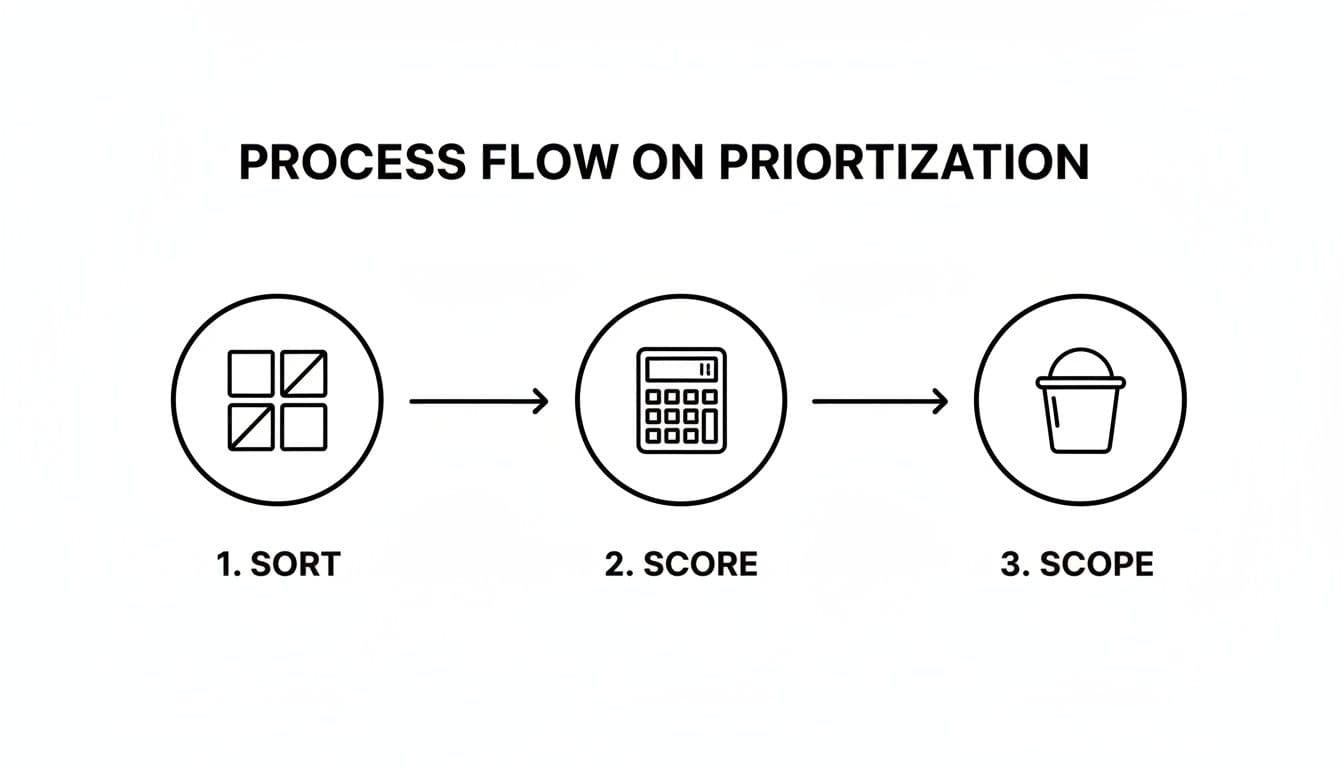
This approach makes sure every action item that comes out of a meeting gets a proper evaluation, instead of just being tossed onto an ever-growing to-do list.
A Practical Workflow Example
Let’s look at a real-world scenario. A team lead, Sarah, just wrapped up a project kickoff call. Instead of heading back to her desk to type up notes, she uses an AI tool that emails her a summary just two minutes after the meeting ends.
The summary looks something like this:
- Action Item: Alex to draft the initial project brief. (Due: EOD Friday)
- Action Item: Maria to set up the shared project folder. (Due: Today)
- Decision: The team will use the MoSCoW framework for feature prioritization.
Sarah can now pop this information straight into her team's project management tool, like Asana or Trello. She creates a task for Alex and one for Maria, plugging in the deadlines directly from the summary. She knows that Maria setting up the shared folder is a blocker for the rest of the team, so she immediately flags it as the highest priority. Alex’s brief is important, but not quite as urgent, so it gets a medium priority.
This whole process takes her less than five minutes. The team gets crystal-clear tasks assigned to them before the details of the meeting have a chance to get fuzzy. To get more out of your meetings from the very beginning, take a look at our guide on how to run effective meetings. When you directly connect your meeting outcomes to your task list, you close the loop and ensure nothing ever falls through the cracks again.
Using Tools and AI to Maintain Your Focus

Let's be honest: even the most perfect prioritization framework is useless if you don't stick with it. The real challenge isn’t just deciding what's important; it's keeping those priorities front and center when chaos hits.
The key is to build a system that makes your priorities visible and almost effortless to manage. You don't need another complex chore. This is where the right technology can be a game-changer, helping you stay on track without getting buried in admin work.
Building Your Prioritization Tech Stack
You don’t need a dozen different apps to make this work. In fact, a simple setup is usually better. The goal is to create a smooth workflow that captures tasks, helps you sort them, and keeps them top of mind.
A great place to start is by creating a direct link between your meeting conversations and your actual to-do list. Here’s what a simple but powerful tech stack could look like:
- AI Meeting Summarizer: Think of this as your scribe. It automatically records decisions and action items from your calls, so you can stop worrying about taking notes and focus on the conversation.
- Project Management Tool: This is your command center. Platforms like Asana, Trello, or Jira are perfect for housing all your tasks, assigning priorities, and tracking everything to the finish line.
When you connect these two, you close the gap between talking about work and doing it. An action item from a meeting gets documented automatically, ready to be dropped onto your task board, assigned to someone, and prioritized.
Making AI a Genuine Ally
AI can be an incredible asset, but only if you use it correctly. There's a curious trend happening right now. While many people say AI boosts their productivity, a whopping 77% of employees feel it has actually lowered theirs, according to a recent PwC workforce survey.
What’s the difference? Strategy. The most successful teams use AI to automate boring, repetitive tasks and summarize information—not to create more work for themselves.
Don’t think of AI as just another tool you have to manage. Treat it like a personal assistant whose main job is to handle the low-value stuff that pulls you away from what really matters. If you're curious about what's out there, we've put together a guide on the 12 best AI tools for productivity in 2025.
Here’s a practical way to put this into practice. Let's say you're a fan of the Eisenhower Matrix. In your project management tool, you can create custom tags that correspond to the four quadrants:
- Do First: Tag tasks as "P1 - Urgent/Important"
- Schedule: Use a tag like "P2 - Not Urgent/Important"
- Delegate: Mark these with "P3 - Urgent/Not Important"
- Delete: Just archive or get rid of the task
Now, when your AI meeting summary pops into your inbox, you can quickly scan the action items and apply the right tags. This literally takes seconds, but it gives you instant clarity on where every task belongs. It’s a simple habit that ensures your focus always stays on the work that moves the needle.
Real-World Prioritization for Different Teams
Frameworks are great in theory, but the real test is applying them when your day is pulling you in a dozen different directions. How you prioritize tasks looks completely different depending on your role.
Let’s walk through a few 'day in the life' scenarios to see how these methods work in the real world. Think of these not as abstract examples, but as tangible playbooks you can adapt for your own daily grind. The key is to match the right framework to the unique pressures and goals of your team.
The Sales Team Balancing Leads and Relationships
If you're in sales, you know the daily tug-of-war between finding new business and nurturing existing accounts. It’s a classic case of balancing what’s urgent with what's truly important.
Imagine a sales rep named Chloe starting her Monday. She opens her CRM and uses a simplified Eisenhower Matrix to make sense of the chaos:
- Do First (Urgent & Important): A key account just emailed with a critical issue. That’s an immediate fire to put out. Plus, she has a scheduled demo with a high-value prospect in two hours. These are non-negotiable and get her full attention right away.
- Schedule (Important, Not Urgent): Chloe needs to prepare a strategic proposal for a major client and research new leads for next month's pipeline. She blocks off dedicated time on Tuesday and Thursday afternoons specifically for this deep work.
- Delegate (Urgent, Not Important): An internal request for updated sales figures just came in. It's time-sensitive, sure, but it doesn’t require her direct expertise. She forwards it to the sales operations assistant.
- Delete (Not Urgent & Not Important): That pile of low-priority internal newsletters isn’t going to close any deals. She archives them to review later, if ever.
This simple sorting process ensures Chloe doesn't let urgent but low-value tasks derail her from the activities that actually drive revenue.