Ever walk out of a meeting feeling like you had a great conversation, only to realize a day later that no one's quite sure what to do next? That's where a summary of a meeting comes in. It’s a short, clear document that captures the most important stuff: the big decisions, key takeaways, and—most importantly—who's doing what next.
Think of it as the blueprint that turns talk into action.
What Is a Meeting Summary and Why Is It Essential?
Imagine a football team breaking from a huddle. The summary is the play everyone just agreed to run. Without that shared understanding, the strategy falls apart as soon as the ball is snapped. Each player might have a slightly different idea of the plan, leading to total chaos. A good meeting summary does the same job in the office.
It becomes the single source of truth. It gets rid of the guesswork and stops those frustrating "But I thought we decided..." conversations that can kill a team's momentum. This isn't just a record of what happened; it's a tool for getting things done.
Turning Conversation Into Action
The real magic of a meeting summary is how it builds momentum. It takes a long, sometimes winding discussion and boils it down into a handful of clear, actionable tasks. While it's related to meeting notes, a summary is a different beast altogether. If you're curious about the specifics, it’s worth exploring the distinctions between meeting notes vs. a summary to see which fits your situation best.
A solid summary makes sure everyone is on the same page, even people who couldn't make it to the meeting. This is a game-changer for remote and hybrid teams where clear communication is everything.
Core Benefits for Every Team
When you get into the habit of writing a summary after every meeting, you start to see some real benefits that make your whole team more efficient and aligned.
- Creates Accountability: When you assign action items with names and deadlines, everyone knows exactly what they’re responsible for. No more dropped balls.
- Ensures Alignment: It confirms everyone heard the same thing and agrees on the priorities. This simple step can prevent huge misunderstandings later on.
- Saves Time: It gives everyone a quick reference point. Instead of re-watching an hour-long recording or bugging colleagues, they can scan the summary in two minutes and get what they need.
The Anatomy of a High-Impact Meeting Summary
Think of a great meeting summary less like a minute-by-minute transcript and more like a strategic blueprint. Its real job is to cut through the chatter and turn an hour of conversation into a clear roadmap for what happens next. Each part has a specific role to play, all working together to create clarity and keep the momentum going.
Without this structure, even the most productive meetings can fizzle out. Ineffective meetings are a huge drain, costing U.S. companies an estimated $37 billion every year. A big reason why is that only 37% of meetings actually lead to clear, concrete decisions. And for remote teams, where Microsoft reports meetings have shot up by 192%, a solid summary is the only thing standing between progress and endless talk.
The secret to a powerful summary isn't just what you put in, but what you purposefully leave out. It's all about being concise.
Key Decisions Made
This is the heart of your summary. Your goal here is to list the final agreements and outcomes in plain, simple language. This section becomes the official record of what the team committed to, leaving no room for confusion.
For example, don't just write, "Talked about the marketing budget." A truly effective summary says, "Decision: The Q3 marketing budget is approved at $50,000, with funds earmarked for the new social media campaign." See the difference? One is a vague memory, the other is a documented fact. Strong note-taking is your best friend here, and you can learn more about how to take better meeting notes to capture these details perfectly.
Action Items with Owners and Deadlines
This is where your summary transforms from a simple document into a tool for accountability. Just listing "to-dos" is a recipe for failure. For an action item to actually get done, it needs two non-negotiable details.
- A Clear Owner: Name one person who is responsible for getting the task done. This immediately gets rid of the "I thought you were doing it" problem.
- A Firm Deadline: Every single task needs a due date. This creates a sense of urgency and gives you a clear way to track progress before the next meeting.
Main Discussion Points
While you're not writing a novel, it's incredibly helpful to briefly mention the key arguments or ideas that shaped the final decisions. This context gives everyone—especially those who couldn't attend—the "why" behind the outcomes. Just stick to the most influential points that moved the conversation forward.
To pull it all together, here’s a quick breakdown of what every solid meeting summary needs.
Essential Elements of a Meeting Summary
This table breaks down the core components that make a meeting summary clear, actionable, and genuinely useful for the entire team.
| Component | Purpose | Example |
|---|---|---|
| Key Decisions | To create a permanent record of final agreements and outcomes. | Approved the final project timeline presented by the design team. |
| Action Items | To assign clear tasks, owners, and deadlines for accountability. | AI: Sarah to send the client proposal by Friday, EOD. |
| Discussion Points | To provide brief context on how decisions were reached. | The team considered two software options before choosing the final vendor. |
By making sure these three elements are always included, you turn a simple recap into a powerful tool that keeps everyone aligned and moving forward.
Practical Templates for Any Type of Meeting
A generic meeting summary is like a one-size-fits-all t-shirt—it rarely fits anyone perfectly. The information a sales team needs is worlds away from what an engineering squad or an executive board requires to move forward. The best summaries are always tailored to their audience and purpose.
To make this easy, we’ve put together three distinct, ready-to-use templates. Each one is designed for a specific team, focusing only on the details that matter most for their unique goals. Think of these less as rigid formats and more as frameworks for driving action.
Using the right template ensures every summary you create is immediately relevant and useful, saving everyone time and making sure important details don't get lost in the noise.
Sales and Client Meeting Template
For sales teams, meetings are all about momentum. The conversation is always centered on pipeline health, client feedback, and closing deals. A summary for this group has to be laser-focused on revenue-driving activities and customer relationships.
This template is structured to capture that forward motion and flag potential roadblocks before they kill a sale. It skips the operational weeds in favor of clear, customer-centric next steps.
- Key Client Insights: What did we learn about the client’s needs, pain points, or decision-making process? (e.g., Client X is concerned about integration timelines.)
- Pipeline Updates: Where do key deals stand? (e.g., Proposal for Client Y moved to the final review stage.)
- Action Items: Who owns the next client touchpoint? (e.g., AI: Mark to send the revised quote by Tuesday, EOD.)
- Objections & Resolutions: What concerns came up, and how did we handle them? (e.g., Addressed budget concerns by offering a phased implementation plan.)
Project and Operations Team Template
Project and operations meetings are the engine room of a company. Here, the focus is all on execution, efficiency, and managing resources. A summary for this team needs to be a clear-eyed report on project health, deadlines, and dependencies.
This template is perfect for keeping everyone aligned on deliverables and making it easy to spot potential delays before they become major problems. It’s all about tracking progress against the plan.
- Milestone Status: Are key project milestones on track, at risk, or delayed? (e.g., Design phase is 90% complete; on track.)
- Blockers Identified: What’s getting in the way? (e.g., Blocker: Awaiting API access from the third-party vendor.)
- Decisions Made: What key operational decisions were finalized? (e.g., Decision: The team will adopt the new workflow automation tool starting next sprint.)
- Action Items: Who is responsible for clearing blockers or tackling the next tasks? (e.g., AI: Chloe to follow up with the vendor for API keys by Wednesday.)
Executive Leadership Team Template
Executive meetings operate at a higher altitude. They're all about strategy, big-picture performance, and making sure different departments are aligned. A meeting summary for leaders has to be concise, strategic, and focused on major organizational decisions and their impact.
This template cuts through the operational details to present a clear picture of the company's strategic direction. It’s designed for busy leaders who need the bottom line, fast.
- Strategic Decisions: What high-level decisions were made? (e.g., Decision: Approved the Q4 budget for market expansion into LATAM.)
- Key Performance Indicators (KPIs): What were the top-level metrics discussed? (e.g., KPI Review: Q3 revenue is up 5% quarter-over-quarter, but customer acquisition cost increased by 8%.)
- Departmental Directives: What key instructions or goals were given to different departments? (e.g., Marketing to develop a strategy for the LATAM launch.)
- Action Items: Who is accountable for driving these strategic initiatives forward? (e.g., AI: CFO to finalize the Q4 budget allocation by end of week.)
Best Practices for Writing with Clarity and Brevity
A truly great meeting summary isn't just a list of what happened. It’s a tool—something your team can grab, scan, and understand in a minute flat. The real goal is to deliver maximum clarity with minimum reading time. A few simple practices can turn your notes from a wall of text into a powerhouse of productivity.
The bedrock of any good summary is objectivity. Think of yourself as a neutral reporter, not a commentator. Stick to the facts: what was decided, who owns the next step, and when it’s due. Sidestep personal opinions or your interpretation of the conversation, as that can muddy the waters and lead to confusion down the road.
Write for Scannability
Let's be honest, people don't read meeting summaries—they scan them. They're looking for their name, their deadlines, and the key decisions that affect them. Your job is to structure the summary to make that as easy as possible.
- Use Bullet Points: They’re perfect for grouping decisions, key discussion points, or action items. Bullets break up long blocks of text and make takeaways easy to digest.
- Embolden Key Details: Make names, dates, and important figures pop. For example, "Action: Michael to finish the Q3 report by Friday, EOD" is instantly clearer than burying that detail in a sentence.
- Keep Paragraphs Short: Aim for one main idea per paragraph, and try to keep them to just two or three sentences. This adds white space and makes the whole document feel less intimidating.
Common Mistakes to Avoid
Even with the best intentions, it's easy to make a few common mistakes that can sink an otherwise good summary. Knowing what these traps are is the best way to steer clear of them.
- Getting Lost in the Weeds: Remember, a summary is not a transcript. Don't feel the need to capture every side conversation or minor point. Focus ruthlessly on the outcomes and the specific information needed to move forward.
- Using Vague Language: Phrases like "look into" or "circle back" are accountability killers. Be specific. Replace them with concrete actions, assign an owner, and set a clear deadline.
- Burying the Lead: Never hide a critical decision or an urgent to-do in the middle of a dense paragraph. Use headings, bold text, and bullet points to make sure the most important information is impossible to miss.
How AI Can Automate Your Meeting Summaries
If your calendar is anything like mine, it’s jam-packed. Jumping from one meeting to the next leaves little time to breathe, let alone compile and share notes. This is where artificial intelligence has become a game-changer. AI meeting assistants are tools that can join your calls, transcribe everything that's said, and then whip up a concise summary of a meeting for you.
Imagine having a dedicated assistant in every meeting whose only job is to capture the important stuff. That's essentially what these tools do. They use smart technology to listen for key moments, figure out who’s talking, and pull out the crucial decisions and action items. This isn't just about saving time—it frees you up to actually participate in the conversation instead of being the designated note-taker.
And the perks don't stop there. AI creates an unbiased, accurate record of the discussion, which is far more reliable than human memory. Over time, you build a searchable library of all your team's conversations, making it incredibly easy to dig up a specific detail from a meeting that happened months ago.
How AI Transforms Your Workflow
Let's be real: trying to summarize every meeting manually is becoming impossible. The Union of International Associations tracked over 535,457 international events, and with 52% of US planners expecting even more meetings in 2025, we need a better way. This gets even trickier for global teams, where meetings across different time zones have shot up by 35%.
So, how does this AI magic actually work? It's a pretty straightforward process.
- Automatic Transcription: The AI tool hops on your call (like a silent observer) and types out a full, word-for-word transcript as the meeting happens.
- Speaker Identification: It's smart enough to tell who is speaking, so the transcript is easy to follow and you know exactly who said what.
- Keyword & Topic Spotting: As the conversation flows, the AI pinpoints the main topics, decisions made, and any tasks that were assigned.
- Instant Summary Generation: The second the meeting ends, you get a neatly organized summary highlighting all the critical takeaways.
This whole process is designed to deliver on the three pillars of a great summary, as shown below.
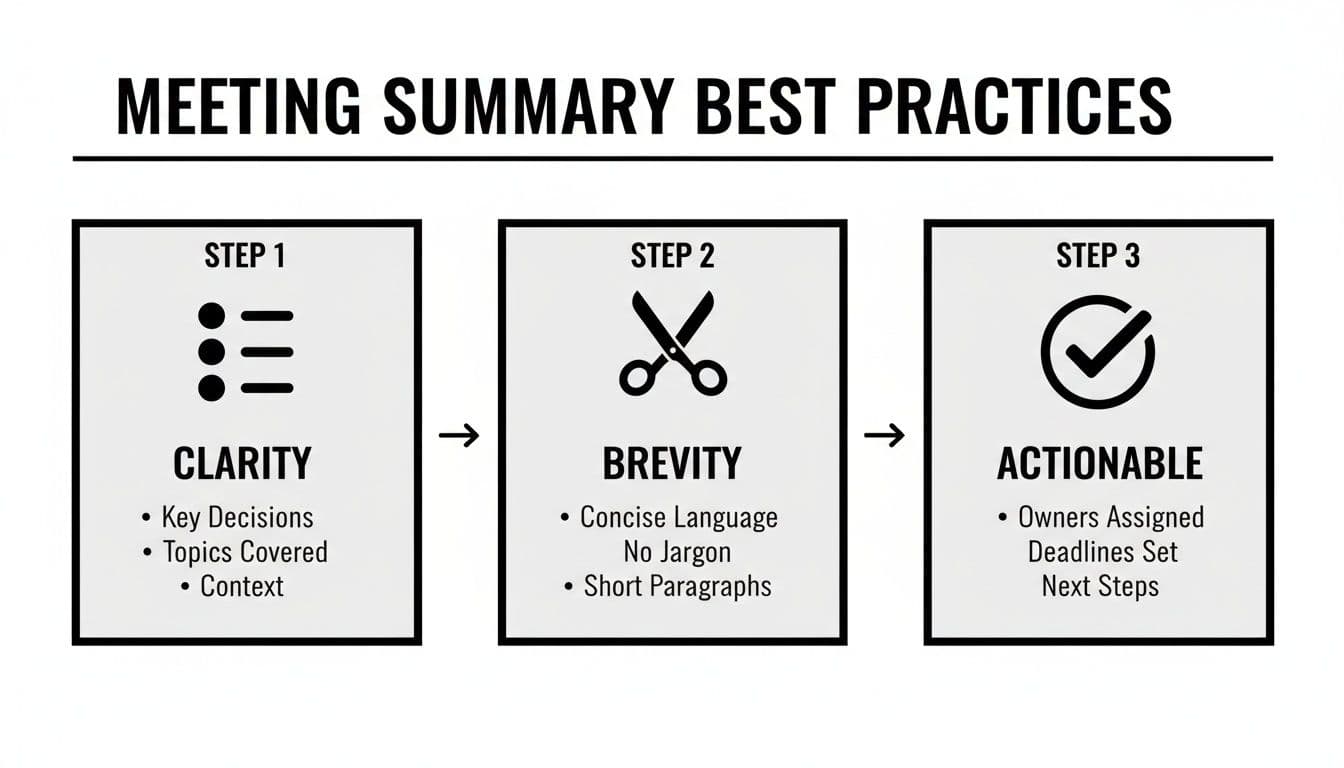
The entire point of using AI is to get you a clear, brief, and actionable recap without you having to lift a finger.
Choosing the Right AI Tool
With a ton of AI summarizers popping up, picking the right one is crucial. My advice is to look for tools that play nicely with the software your team already uses, like Slack, Asana, or your CRM. Accuracy is also a huge deal—if your team throws around a lot of technical terms or industry jargon, you need an AI that can keep up.
Getting the most out of these tools sometimes means learning how to guide them. Spending some time exploring prompts in the OpenAI Playground can teach you how to ask the AI for exactly what you need. If you want a deeper dive into the top options, check out our guide on the best AI notes generator tools for meetings in 2025.
Your Top Questions About Meeting Summaries, Answered
Even when you've got the process down, a few practical questions always seem to pop up. Let's tackle the most common ones so you can keep things running smoothly and your team on the same page.
Getting these details right can be the difference between a summary that works and one that gets ignored.
Who Is Actually Responsible for Writing the Meeting Summary?
This is a classic "who's on first?" problem. The best way to solve it is to assign the role of note-taker and summarizer before the meeting even starts. No more guessing games or awkward silences when someone asks where the notes are.
You can rotate this duty among team members to share the load, or have a designated person, like a project manager or team lead, handle it every time. For recurring meetings, having the same person write the summary often leads to more consistent and useful notes over the long haul.