Meeting management software takes care of the entire meeting process for you, from setting up agendas everyone can contribute to, all the way to transcribing the call and keeping track of who needs to do what afterward. For any modern business, these tools are essential. They turn messy, disorganized calls into productive work sessions that actually move projects forward and save a ton of time.
Why Your Business Needs Software for Meeting Management
In a world full of hybrid and remote work, "meeting fatigue" is a real problem that crushes productivity. Teams are constantly jumping from one call to the next, frantically trying to take notes while also participating. It's a recipe for disaster—key decisions get lost, follow-ups are forgotten, and nobody is quite sure who's responsible for what.
This is where dedicated software for meeting management comes in. It replaces the chaos of scattered notes and foggy memories with a smart, central hub for every single conversation.

From Chaos to Clarity
The biggest win here is turning jumbled discussions into clear, actionable results. These platforms create a single source of truth, making sure everyone is on the same page.
- Searchable Transcripts: Need to find that one thing a client said last week? Just search the transcript. No more re-watching hour-long recordings. This is a lifesaver for sales and customer success teams who need to recall specific details in a flash.
- Automated Action Items: The AI is smart enough to listen for tasks, assign them to the right person, and create a clear to-do list. This simple feature is huge for keeping projects moving and holding people accountable.
- Serious Time Savings: Think about all the time spent typing up notes and writing summaries. By automating that grunt work, teams get those hours back. Some cities have even cut their agenda prep time by 40% to 50%, letting their staff focus on more important things.
A Growing Market for a Critical Need
It's no surprise that these tools are catching on fast. The global market for meeting management software was worth around USD 2.5 billion in 2023 and is expected to hit USD 8.7 billion by 2032. That kind of growth shows just how vital these platforms have become for teams collaborating across different time zones.
Ultimately, this software helps teams learn how to run effective meetings by providing the structure and follow-through that most of us struggle with. It’s not just a nice-to-have tool; it's a core piece of the puzzle for any team serious about efficiency. If you want to dive deeper, our guide on meeting management best practices for 2025 is a great place to start.
What to Look for in a Meeting Management Tool
Choosing the right meeting software is about more than just ticking off a feature list. The best tool isn't the one with the most functions; it's the one that fits so well into your team's workflow that you forget it's even there. To find that perfect fit, it helps to think about how a meeting actually works.
I find it easiest to break down the evaluation into three simple stages: what happens before, during, and after the meeting. Looking at features through this lens helps clarify their real-world value and how they'll actually help your team get things done.
Pre-Meeting Preparation Features
Great meetings don't just happen. They're the result of good preparation, and the right software can make that almost effortless. The goal here is to make sure everyone shows up ready and on the same page.
This stage is all about collaborative organization.
- Collaborative Agendas: Move beyond static documents. Look for tools that let team members build the agenda together in real time. This ensures everyone's key topics are included and turns the agenda into a truly useful guide for the conversation.
- Calendar Integration: This is a deal-breaker. The software must sync flawlessly with Google Calendar or Outlook. It should automatically pull in meeting details, attach agendas, and handle reminders without you having to lift a finger.
These prep features directly tackle the biggest reason meetings fail: lack of preparation. Some teams I've worked with have cut their agenda prep time by 40% to 50% just by automating these simple first steps.
In-Meeting Intelligence and Assistance
Once the meeting starts, the focus shifts to capturing the conversation accurately without getting in the way. This is where the AI really proves its worth, acting like a personal assistant for everyone on the call.
The best tools capture everything perfectly, so you can focus on the discussion.
Here are the in-meeting capabilities that really matter:
- Real-Time Transcription: This is the bedrock. A live transcript lets people follow along, catch up if they join late, or review a point without interrupting the speaker.
- Speaker Identification: Knowing who said what is essential. This feature accurately tags each part of the conversation to the right person, which is a lifesaver for reviewing sales calls or complex project meetings.
- AI Copilots and Assistants: The most advanced tools give you an AI assistant you can interact with during the meeting. Ask it to summarize the last ten minutes or list out action items without ever breaking the flow of conversation.
Post-Meeting Automation and Analysis
The meeting is over, but the work isn't. This final stage is all about turning that conversation into action and making sure nothing falls through the cracks. The best meeting platforms automate this entire handoff.
This is where you'll see a massive return on your investment. Instead of someone spending an hour cleaning up notes and creating tasks, the software does it in seconds.
- Automated Summaries: The AI should instantly generate clear, useful summaries. You should be able to get everything from a high-level bulleted list for an executive to detailed notes for the project team.
- Action Item Extraction: The platform needs to be smart enough to spot action items, pull them out, and assign them to the right people. The best tools even sync these tasks directly to your project management software, like Asana or Jira.
- Searchable Transcripts and Analytics: The full transcript becomes a searchable knowledge base. Customer success teams can instantly find specific client feedback, while sales managers can analyze call patterns to spot coaching opportunities. It’s a goldmine of data.
Comparing the Top AI Software for Meeting Management
Jumping into the world of AI meeting tools can feel like a lot. While tons of platforms claim to record, transcribe, and summarize your calls, how they actually perform depends entirely on what you need them for. The best tool for a sales team living in their CRM is probably the wrong choice for a global team that needs flawless multi-language support.
This comparison goes beyond the marketing fluff. We're going to break down four of the biggest names in the game: Fireflies.ai, Otter.ai, Notta, and Sembly AI. We'll focus on the details that really make a difference, like how well they handle industry jargon, how deeply they connect with your other tools, and whether the AI insights are genuinely useful.
The goal here is simple: to give you a clear, practical look at how these tools work in the real world. We'll show you exactly where each one shines, so you can pick the right partner for your team.
Transcription Accuracy and Speaker Identification
At the heart of any meeting tool is its ability to nail who said what. If the transcript is a mess, every other feature—from summaries to action items—is built on a shaky foundation. But accuracy isn't just about a single percentage; it's about how the AI handles the chaos of a real conversation.
Fireflies.ai does a great job with standard business talk, but its real secret weapon is the custom vocabulary feature. You can teach it your company's acronyms, product names, and technical terms. This is a huge deal for specialized meetings, like engineering stand-ups or product demos, where accuracy usually takes a nosedive.
Otter.ai, on the other hand, built its name on incredible real-time transcription. Its engine is tuned for speed and clarity, which is why it became a fast favorite for journalists and researchers. If your team needs to follow along with a live transcript as the meeting happens, Otter just feels smoother and more responsive than the competition.
Notta carves out its own niche with top-notch multi-language support and accent recognition. Supporting over 100 languages and dialects, it's the obvious choice for global teams or companies with a diverse workforce. Its ability to accurately capture a conversation with multiple accents on the same call is a true game-changer.
Finally, Sembly AI delivers solid transcription but really pulls ahead with its speaker identification, especially on crowded calls. It does a fantastic job of telling speakers apart, even when people talk over each other—a common problem that trips up other tools. This makes reviewing a complex discussion with lots of voices so much easier.
Integration Ecosystem Depth and Workflow Automation
A meeting tool shouldn't be a dead end. Its real power comes alive when it talks to the other software you rely on every day, whether that’s your CRM, project manager, or team chat.
This is where Fireflies.ai has a clear edge. It has one of the biggest integration libraries out there, connecting deeply with platforms like Salesforce, HubSpot, Asana, and Slack. For sales teams, its knack for automatically logging meeting notes and summaries under the right contact in the CRM is a lifesaver. It doesn't just move data around; it fully automates your post-meeting grunt work.
Otter.ai covers the essentials, connecting well with Zoom, Microsoft Teams, and Google Meet. It also links up with Dropbox for storage and has a Zapier hook for more custom workflows. Still, its native integrations are less about deep automation and more about basic connectivity. It's a great fit for teams who just need a solid transcript and summary, not an end-to-end automated system.
Sembly AI takes a more focused approach, building powerful connections with key systems like Salesforce and monday.com. Its strength is in how it uses that data to make its AI insights even smarter. For example, it can pull context from your CRM to better understand the topics discussed on a sales call.
Notta offers a practical set of integrations with popular tools like Salesforce, Google Calendar, and Notion. It’s all about making the post-meeting workflow efficient—sending transcripts and summaries right where your team works. It's a straightforward approach that works perfectly for many small and mid-sized businesses. To explore a wider range of artificial intelligence tools that enhance sales processes, including those that can assist with meeting management, see our guide on the best sales AI software.
AI-Powered Insights and Summarization Quality
Beyond just spitting out a block of text, the best platforms dig deeper to find the important stuff. They can spot key topics, track sentiment, and pull out critical decisions or questions. The quality of these insights is what separates a good tool from a great one.
Sembly AI is a real standout here. Its "glance view" is designed to give you high-level intelligence in seconds. It automatically generates a "Meeting Mood" analysis, flags risks and issues, and creates a structured summary that organizes everything neatly. This is incredibly valuable for managers and execs who need to get the gist of a meeting without reading the whole transcript.
Fireflies.ai also delivers strong analytical features. With its Smart Search and Topic Trackers, you can filter conversations across all your meetings for specific keywords, metrics, or competitors. For sales coaching, this is gold—you can instantly see how often pricing objections or a certain competitor's name comes up.
Otter.ai has been beefing up its summary game with its Automated Outline. It gives you a "CliffsNotes" version of the meeting with clickable timestamps, making it easy to jump to key moments. It's effective for a quick overview but doesn't offer the same depth of semantic analysis as Sembly AI or Fireflies.ai.
Notta focuses on clean, structured summaries that you can customize. You can pick from different templates to get the exact format you need, whether it's a simple paragraph or a detailed list of action items. This focus on practical, well-organized output makes it incredibly user-friendly for teams that value clear and consistent documentation.
This whole space is booming for a reason. Cloud-based meeting software has taken over, with the global market projected to more than double from US8.378 billion in 2024 to US15.78 billion by 2031. For IT managers, the appeal is clear: the cloud model can be 30-50% cheaper than old-school on-premises solutions, making it a no-brainer for managing lots of meetings. You can learn more about this trend in this detailed report on meeting management software trends.
Feature Scorecard for Leading Meeting Management Software
To help you see how these tools stack up at a glance, we've scored each one on the criteria that matter most. We rated them on a scale of 1 to 5, where 5 is the best.
| Feature | Fireflies.ai | Otter.ai | Notta | Sembly AI | Best For |
|---|---|---|---|---|---|
| Transcription Accuracy | 4 | 5 | 4 | 4 | Journalists & Academia (Otter) |
| Speaker Identification | 4 | 4 | 4 | 5 | Complex Group Calls (Sembly) |
| Integration Ecosystem | 5 | 3 | 3 | 4 | Sales & Revenue Teams (Fireflies) |
| AI-Powered Insights | 4 | 3 | 3 | 5 | Executives & Leadership (Sembly) |
| Multi-Language Support | 3 | 2 | 5 | 3 | Global & Remote Teams (Notta) |
| Ease of Use | 4 | 5 | 5 | 4 | Startups & Individuals (Notta/Otter) |
As the scorecard shows, there’s no single "best" tool for everyone. The right choice really comes down to what your team values most. A sales team will get a massive return from the CRM automation in Fireflies.ai, while a global company would be lost without Notta's language support. Now, let’s dig into these specific use cases to help you find the perfect fit.
Choosing the Right Software for Your Team's Needs
Picking the right meeting management software isn't about finding a single "best" tool. It’s about matching the right capabilities to your team’s unique workflow and biggest headaches. A fast-paced sales team has completely different needs than an executive leadership circle or a globally scattered workforce. That’s why you have to look past generic feature lists and think about who will actually be using it.
Your decision really boils down to your primary goal. This visual decision tree can help you see which type of tool fits your main objective.
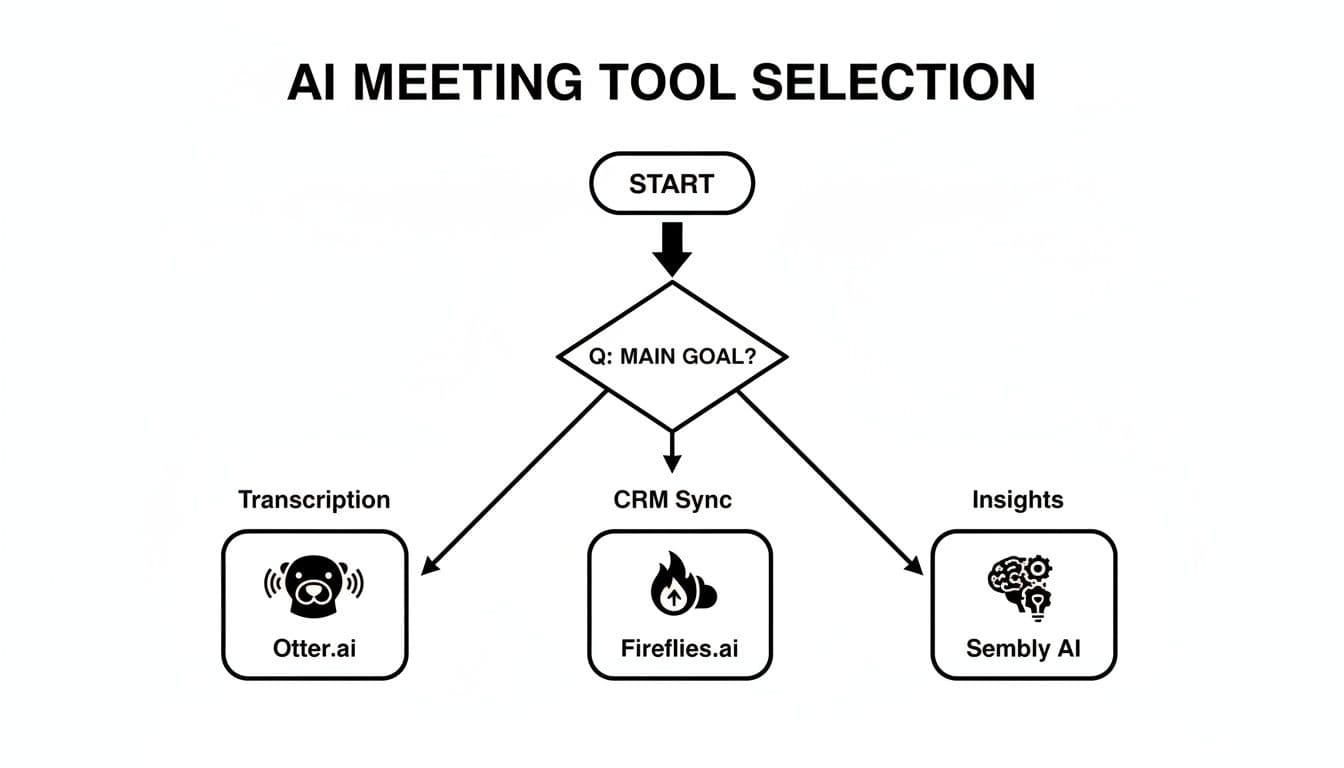
As the flowchart shows, what you need most—be it simple transcription, deep CRM integration, or high-level strategic insights—points you toward a specific category of software. Let's break down these recommendations for a few common teams.
For Sales and Revenue Teams
Sales teams practically live inside their CRM. Any meeting tool that doesn't sync flawlessly with platforms like Salesforce or HubSpot is a non-starter. The goal here is to automate all that tedious post-call data entry and surface real, actionable deal intelligence.
This is where Fireflies.ai really shines, thanks to its deep CRM integrations. It can automatically log call notes, summaries, and transcripts under the right contact, saving reps hours of manual work every week. Even better, its Topic Trackers can flag competitor mentions, pricing objections, and buying signals across every call, giving sales leaders an incredible tool for coaching and forecasting.
For Remote and Global Teams
When your team is spread across different time zones and countries, crystal-clear communication is everything. The right meeting software has to break down language barriers and make asynchronous work possible, letting people catch up on conversations they missed.
Notta is built for this kind of environment, with its impressive support for over 100 languages. Its ability to accurately transcribe calls with multiple accents is a game-changer for international organizations. This ensures no one gets left out of the loop because of language, making every discussion accessible to the whole team, no matter where they are.
If you want to dive deeper into your options, our guide on choosing your meeting management software offers some helpful frameworks.
For Startups and Small Businesses
Startups and small businesses need tools that are powerful but also simple to set up and affordable. They can’t afford a long, complicated rollout or a platform with a steep learning curve. The priority is getting value right away.
Both Otter.ai and Notta are fantastic choices here. Otter.ai is well-known for its best-in-class real-time transcription and a super intuitive interface, making it easy for anyone to get going immediately. Notta offers a similar simplicity with flexible, well-organized summaries that help small teams stay aligned without needing a project manager to chase down notes.
For Executives and Leadership
Executives are short on time and need to absorb critical information fast. They aren't going to read full transcripts; they need high-level, strategic insights to make smart decisions. The best tool for them cuts through the noise and highlights what really matters.
Sembly AI is designed for this exact purpose. Its "glance view" and automated "Meeting Mood" analysis give leaders a quick understanding of a discussion's key takeaways, risks, and action items. This focus on actionable intelligence over raw text makes it perfect for leadership teams who need to stay on top of multiple projects without getting buried in the details.
This demand from corporate users is driving huge growth, with the industry expected to hit USD 8.9 billion by 2031. Teams are desperate for solutions to combat the 23 hours lost weekly to unproductive meetings, a trend you can read more about in this market research report.
How to Implement and Drive Team Adoption
You’ve done the hard work of picking the right AI meeting tool. Great. But now comes the real challenge: getting your team to actually use it. The best software in the world is useless if it just sits there, so a smart rollout is everything.
Success isn't about forcing a new tool on everyone. It's about showing them how it makes their lives easier, so they want to use it. This means having a real strategy that covers both the technical setup and the people side of things.
Start with a Pilot Program
Don't overwhelm the whole company at once. Start with a small, focused pilot group to test the waters. This lets you work out the bugs and collect real-world feedback before you go all-in.
- Find Your Champions: Grab a group of 5-10 people from different teams who are generally excited about new tech. They’ll be your biggest advocates later on.
- Define Success: What does a "win" look like for this test? Maybe it's cutting down the time spent writing meeting notes by 25%. Or perhaps it's getting 100% of sales calls logged automatically in your CRM. Be specific.
- Listen and Learn: Check in with your pilot team regularly. Find out what they love and what drives them crazy. Their feedback is gold—use it to tweak your training guides before the company-wide launch.
Running a small-scale test like this helps you build a strong, data-backed case for why the entire organization should get on board.
Establish Clear Usage Guidelines
You need a simple playbook to make sure everyone is on the same page. This isn't about creating a massive rulebook; a one-page cheat sheet is usually perfect.
Your guidelines should answer a few basic but critical questions: