A great meeting follow up is what turns a good conversation into tangible action. So why is it the first thing to get dropped when things get busy? It’s usually not because of bad intentions. Most follow-ups fall flat because they lack a clear structure, which kills clarity and accountability, turning brilliant ideas into forgotten to-do list items.
Why Most Meeting Follow Ups Fail To Drive Action

We've all been there—you walk out of a meeting feeling pumped and on the same page, but a few days later, that energy is gone. Poof. That’s not just a feeling; it’s a massive, expensive problem for businesses. When a follow-up is late or poorly written, the context and urgency from the discussion just fade away, leaving projects stalled and opportunities on the table.
The financial cost is genuinely shocking. Unproductive meetings cost companies an eye-watering $399 billion every year in the US alone, with billions more lost worldwide. A huge chunk of that waste comes directly from what happens after the meeting ends—or rather, what doesn't happen. This is exactly the problem a solid follow-up process is meant to fix.
The Anatomy of a Failed Follow Up
So where does it all go wrong? It usually breaks down in a few predictable places. When you don't have a system, important details slip through the cracks and nobody is quite sure who's supposed to do what. This is where most teams get stuck.
Here are the most common failure points I see:
- Vague Action Items: You can't do anything with a task like "look into marketing." It needs a verb, a clear outcome, and a firm deadline. Otherwise, it’s just a suggestion.
- No Clear Ownership: If you assign a task to the whole team, you've basically assigned it to no one. Every single action item needs one person who is directly responsible for getting it done.
- Delayed Communication: The golden rule is to send your recap within 24 hours. If you wait even 48 hours, people's memory of the details and their sense of urgency will have dropped off a cliff.
Once you know where the traps are, you can start building a better process. Stop thinking of the follow-up as a boring administrative task and start seeing it for what it is: the engine that keeps momentum going. Getting this mindset right is half the battle. Our guide on how to run effective meetings can also help you build that solid foundation from the start.
How To Write A Follow-Up Email That Actually Gets Read
Let’s be honest: a generic follow-up email is a waste of everyone's time. The point isn't just to prove the meeting happened. It’s to lock in the key decisions, clarify who’s doing what, and keep the project moving forward.
Getting this right starts with the very first thing your recipient sees: the subject line. "Meeting Follow Up" is a one-way ticket to the archives folder. Think of your subject line as the email's headline—it needs to be specific and offer value.
Here are a few angles that work:
- Be Action-Focused: "Next Steps from Our Q3 Project Kickoff"
- Be Descriptive: "Decisions & Action Items from Today's Sales Sync"
- Get Personal: "Great connecting, [Name]! Here's the plan we discussed"
A simple tweak like this instantly reframes your email from a boring administrative task into a useful summary people actually want to open.
The Anatomy Of A Scannable Email
Once they’ve opened it, you have seconds to hold their attention. Nobody has time to wade through dense paragraphs. Start with a quick, personal line that reconnects with the positive vibe of the meeting. Something simple like, "Great discussion earlier—I'm feeling really optimistic about our direction."
Then, get straight to the good stuff. Use bold headings, bullet points, and short sentences to make the core information pop. Your goal is ruthless clarity. For a deeper dive into different styles, our guide on 8 powerful meeting follow-up email examples for 2025 offers some great inspiration.
This isn't just about looking organized; it's a sign of respect for your colleagues' time, which makes them far more likely to engage.
Action Items: The Only Part That Really Matters
If you get one thing right, make it this. Vague tasks are where momentum goes to die. Every single action item you list must have a clear owner and a firm due date. No exceptions.
Assigning a task to "the marketing team" is a recipe for diffusion of responsibility—everyone thinks someone else has it covered. Assign it to one person. Likewise, a deadline like "ASAP" or "next week" is useless. "End-of-day Friday, Oct 25th" is impossible to misinterpret.
Here’s a simple way to structure your follow-up emails for different kinds of meetings.
Follow Up Email Templates For Different Scenarios
These are adaptable templates designed for common business meetings, from initial sales calls to internal project updates. Think of them as a starting point to ensure clarity and drive action.
| Meeting Type | Subject Line Example | Key Body Components |
|---|---|---|
| Initial Sales Call | Great Chatting About [Company Name] & [Goal] | Personal connection, summary of their pain points, recap of your proposed solution, clear next step (e.g., "I'll send the proposal by EOD"). |
| Internal Project Kickoff | Action Items & Next Steps: [Project Name] Kickoff | Quick thank you, link to meeting recording/notes, bulleted list of key decisions, clear table of action items with owners & dates. |
| Client Check-In | Quick Recap of Our Call Today | Positive opening, confirmation of project status, list of any new requests or action items, confirmation of next meeting date. |
| Executive/Leadership Sync | Key Decisions from [Date] Leadership Meeting | High-level summary of strategic decisions, concise action items assigned to specific leaders, and any cascading information to be shared with teams. |
Having a few go-to structures like these can save you a ton of time. For more inspiration, you can always check out some of the best follow up email templates and customize them to fit your specific needs.
Ultimately, this level of detail is what transforms a simple recap into a powerful tool for accountability and progress. It removes all the guesswork and keeps everyone perfectly aligned.
Mastering the Cadence of Your Follow-Up
The single biggest mistake you can make with a meeting follow-up is waiting too long to send it. I've seen it happen a thousand times: a great conversation full of energy and bright ideas just fizzles out because nobody acted quickly. That post-meeting clarity has a very short half-life.
Sending your follow-up within 24 hours should be your golden rule. This isn't just about being polite; research shows this simple act can boost task recall among attendees by a whopping 80%. When you delay, you're not just being slow—you're actively letting the momentum die. Details get fuzzy, and urgency evaporates. For internal projects especially, that velocity is everything.
Finding the Sweet Spot for Sales Follow-Ups
For anyone in sales, the follow-up cadence is a delicate dance. You want to stay on their radar without becoming a pest. The data actually gives us a pretty clear roadmap here. It might sound counterintuitive, but sometimes waiting a bit can pay off. A follow-up sent three days after a meeting can actually see a 31% higher response rate compared to one sent the next day, which often just gets buried in the daily email avalanche.
But here’s the real secret: persistence pays. The first follow-up email after a meeting naturally gets the highest response (8.4%), but it doesn't drop off a cliff after that. Yet, an incredible 92% of salespeople give up by the fourth attempt. Think about that. Most deals require 5 to 12 touches to close, which means a huge number of opportunities are being left on the table. You can dig into more of this data on meeting statistics and follow-up effectiveness on flowtrace.co.
This chart really drives home what makes a follow-up email land. It tells you exactly where to focus your energy.
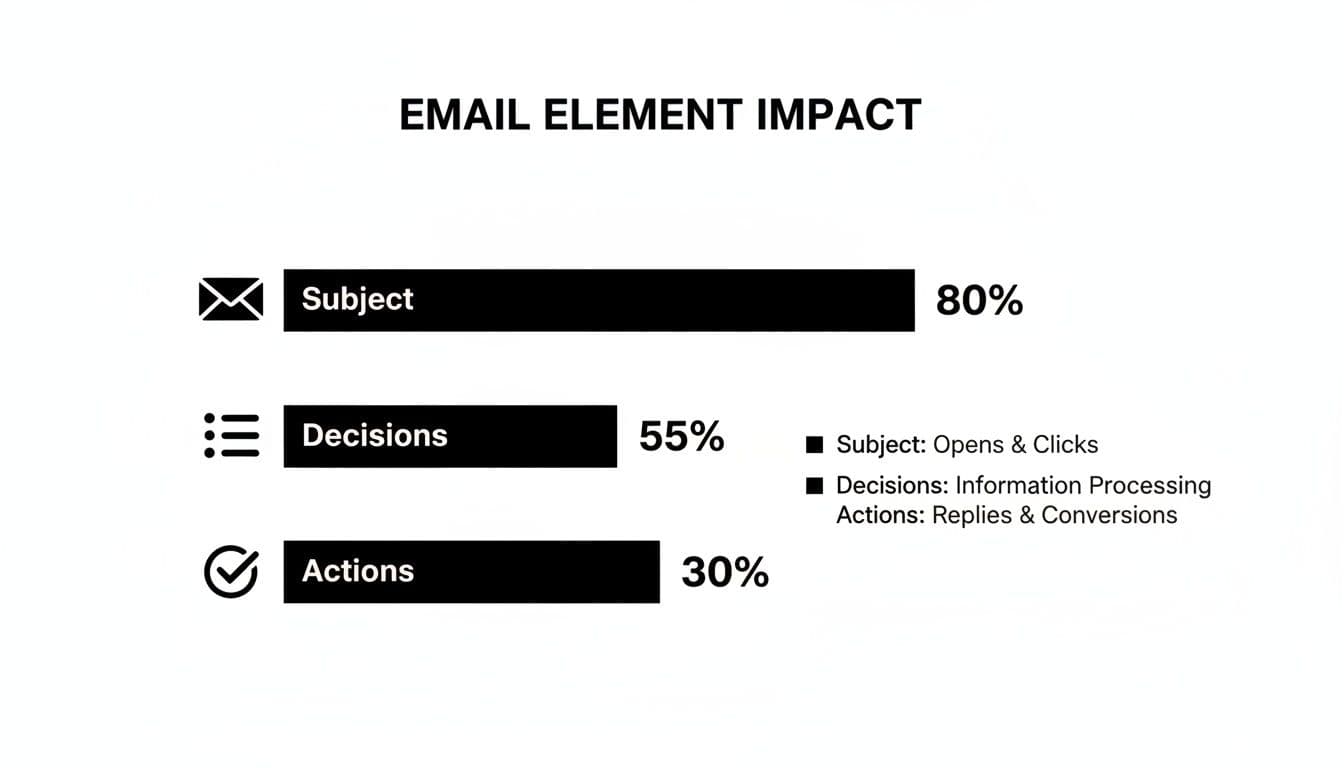
As you can see, a killer subject line is what gets the email opened in the first place. But once they're reading, it's the clear decisions and action items that actually get things done.
The Cadence for Internal Teams and Project Management
When you’re working with your own team, the rhythm is different. It's less about persuasion and all about accountability and keeping everyone on the same page. That first follow-up should still land within 24 hours to set the tone and create an official record.
From there, your cadence should mirror the project's own timeline. Here’s a simple, practical schedule I’ve used that you can adapt:
- The Initial Recap: Get this out within 24 hours. It's the official record of what was decided and who's doing what.
- Mid-Point Check-In: If a deadline is a week out, a quick "How's it going?" on day three or four can uncover roadblocks early. This isn't micromanaging; it's proactive support.
- Pre-Deadline Nudge: Send a gentle reminder the day before something is due. It helps keep tasks on track without causing a last-minute panic.
- The "Done" Confirmation: Once a key task is finished, a quick note acknowledging it closes the loop and gives credit where it's due.
This kind of structured approach turns your follow-up from a single email into a continuous communication loop. It’s how you make sure everyone stays aligned and feels supported, which is really the whole point of having a meeting in the first place.
How to Adapt Your Follow-Up for Any Audience

Sending a generic meeting recap is a massive missed opportunity. The email you draft for your CEO should look nothing like the one you send a new sales prospect. A one-size-fits-all approach just feels impersonal and, frankly, it doesn't work.
The secret to a truly effective follow-up is tailoring your tone, content, and focus to the person on the other end. This isn't about being fake; it's about being relevant. A project manager on your team needs the nitty-gritty details on deadlines, while an executive just wants the high-level strategic takeaways. Nail this difference, and your communication will actually land with impact.
Tailoring Your Follow-Up for Sales Prospects
In sales, the follow-up is where the magic really happens. Your main goal here is to keep the momentum going and build on the relationship you started. It’s a delicate dance between being persistent and genuinely providing value.
The stakes are incredibly high. Somewhere between 35% and 50% of sales go to the vendor that responds first. And yet, a mind-boggling 92% of salespeople give up after four "no's," even though 80% of sales require at least five follow-ups to get to "yes." You can dig into more stats about follow-up effectiveness in sales on salesgenie.com.
When you reach out to a prospect, your message needs to do a few key things:
- Reiterate Their Pain Points: Start by summarizing the specific challenges they mentioned. It proves you were actually listening.
- Connect Your Solution Directly: Frame your product or service as the clear answer to those specific problems.
- Propose a Clear, Easy Next Step: Don't just end with a vague "let me know." Suggest a concrete action, like, "Does Thursday at 2 PM work for a quick 15-minute demo to show you exactly how this works?"
Communicating Up to Executives
When you're messaging leadership after a meeting, you need to completely shift gears. Executives are always short on time and focused on the big picture. They don't need a play-by-play; they just need the bottom line.
Your email to a leader should be brutally concise. Get straight to the point and focus on:
- Strategic Decisions Made: What was the final call on the big-picture items?
- Business Impact: Briefly explain how these decisions move the needle on key company goals or metrics.
- Required Resources or Approvals: Clearly state exactly what you need from them to move forward.
Use bullet points and bold text so they can scan it in 10 seconds and get everything they need.
Keeping Remote and Global Teams Aligned
For remote and globally distributed teams, the meeting follow-up is the ultimate source of truth. With colleagues spread across different time zones, this document is what keeps everyone on the same page and prevents wires from getting crossed.
Your follow-up for a distributed team has to be exceptionally clear and detailed. It's not just a recap; it's the playbook everyone will work from, regardless of when their workday begins.
A few must-haves for a remote team follow-up:
- Links to Recordings and Transcripts: This is non-negotiable. It gives anyone who couldn't attend live a chance to catch up completely.
- Explicit Deadlines with Time Zones: Always, always specify the time zone (e.g., "Due by 5 PM EST / 2 PM PST"). This simple step avoids so much confusion.
- A Central Hub for Questions: Point everyone to a specific Slack channel or project management thread to keep all related conversations in one place.
This level of detail is the glue that holds a remote project together. It prevents the kind of fragmentation that can so easily derail a team's hard work.
Using AI to Automate Your Follow-Up Workflow
Let's be honest: nobody loves typing up meeting notes and drafting follow-up emails. It's a tedious, time-sucking chore that often gets pushed aside until it's too late. This is exactly where AI-powered meeting assistants have completely changed the game, turning a manual headache into a surprisingly simple process.
Tools like Fireflies.ai, Otter.ai, and Notta are built to do the grunt work for you. They can join your calls, transcribe everything that’s said in real-time, and then use AI to pinpoint key decisions and action items. This frees you up to actually participate in the conversation instead of frantically trying to take notes.
A Practical Automated Workflow
Picture this: you wrap up a big sales call. Instead of spending the next 30 minutes trying to remember every single detail, an AI has already captured it all. You just hit record when the meeting starts, and a few minutes after it ends, a full transcript and an AI-generated summary land in your inbox.
This summary isn't just a wall of text. It’s smartly organized and highlights the most important takeaways. The best part is that the AI has already pulled out a list of potential action items, often assigning them to the right person.
Here’s a look at what this can feel like in practice.
As you can see, the AI drafts the follow-up email for you. Your job shifts from writing from scratch to simply reviewing the draft, maybe tweaking the tone a bit, and hitting "send." What used to be a 30-minute task becomes a quick two-minute check.
If you're exploring how to bring this kind of efficiency to your work, it’s worth looking into different intelligent automation use cases that go beyond just meeting notes.
Choosing the Right AI Tool
While a lot of these AI assistants look similar on the surface, the best one for you really boils down to your team's specific needs. They aren't all one-size-fits-all.
- For Sales Teams: Prioritize tools with solid CRM integrations, like Salesforce or HubSpot. This lets the AI automatically log notes and action items right into your customer records, which is a massive time-saver.
- For Global Teams: If you’re constantly meeting with international clients or colleagues, look for strong multi-language transcription and translation features. It's a must-have.
- For Technical Teams: Some tools let you build a custom vocabulary. This is perfect for technical teams that use a lot of industry jargon, ensuring your transcripts are actually accurate.
Picking a tool that fits your workflow does more than just speed up your meeting follow up; it creates a system that’s more consistent and accountable. For a more detailed breakdown, check out our complete guide to meeting follow-up automation. Ultimately, this lets your team spend less time on admin work and more time doing what was actually decided on in the meeting.
Frequently Asked Questions About Meeting Follow-Ups

Even with a solid game plan, you're bound to run into some tricky situations. Here are some quick answers to the questions I hear most often from people trying to nail their meeting follow-up game.