Information overload is that sinking feeling you get when you’re facing more information than you can possibly handle. Think of it like trying to drink from a firehose. The sheer volume of data coming at you isn't helpful; it just creates stress and confusion.
The Daily Deluge of Digital Noise

In the workplace, information overload is the relentless stream of emails, Slack messages, reports, and back-to-back meetings that chew up your day. It’s not just the amount of information that’s the problem; it’s the unspoken expectation that you need to absorb and act on all of it right now. This constant pressure shatters any chance of deep focus, leaving you in a state of perpetual interruption.
This isn't just about "being busy." It's a genuine breakdown in our ability to manage the digital chatter. It’s really a cognitive issue at its core. To get a better sense of how our brains just can't keep up, it helps to understand what is cognitive overload and how to fix it.
Numbers Behind the Noise
The scale of this problem is hard to wrap your head around. In 2022, an incredible 333 billion emails were sent across the globe every single day. The average worker now spends nearly four hours of their workday just wrestling with emails and video calls. This digital drain costs U.S. companies an estimated $21 billion a week in lost productivity.
Why This Matters for Your Team
This isn't just an abstract problem; it’s a major bottleneck for any team, whether you're in sales, IT, or marketing. Information overload directly hits your efficiency, decision-making, and even your team's mental health.
You’ll see it show up in a few key ways:
- Decision Paralysis: With too much data, teams get stuck and can't make a clear call.
- Reduced Innovation: There’s simply no mental bandwidth left for creative or strategic thinking.
- Employee Burnout: The constant pressure to keep up is a fast track to exhaustion and disengagement.
- Communication Breakdown: Critical messages get buried under an avalanche of less important notifications.
This guide is about fighting back. We’ll walk through the hidden costs, show you how to spot the warning signs, and give you real strategies—including how to use AI—to help your team finally cut through the noise and get back to doing meaningful work.
The Hidden Costs of Too Much Information
Information overload feels personal, like you’re the only one drowning in emails and notifications. But it’s not just a source of individual stress; it’s a silent saboteur quietly draining your company's bank account. The consequences ripple across every department, directly impacting your bottom line. It's a strategic threat disguised as a busy inbox.
The constant barrage of data, pings, and meeting invites makes deep, focused work almost impossible. Employees aren't just busy; they're perpetually distracted. This constant "context switching"—jumping from an email to a Slack message to a project update—comes at a steep price. One study found the average employee flips between different apps nearly 1,200 times a day, losing a little more focus with every single switch.
This digital whiplash erodes your team’s ability to do the kind of work that actually moves the needle. You end up with a workforce that’s always active but rarely productive.
The Financial Drain of Digital Noise
When you start adding up the lost minutes and misdirected efforts, the financial picture becomes alarmingly clear. Information overload isn't some abstract HR concept; it's a measurable drain on real-world resources.
The problem is massive. Information overload is estimated to be a trillion-dollar drag on the U.S. economy each year, fueled by collapsing productivity and widespread burnout. Globally, 76% of workers point to it as a daily source of stress. Even more telling, 45% of employees find that simple communication is the most mentally taxing part of their job.
This damage shows up on your balance sheet in a few key ways:
- Wasted Payroll: Think about all the hours your team spends just trying to find information in a cluttered inbox or a labyrinth of shared drives. You're paying for that search time, and the return is zero.
- Project Delays: When teams are paralyzed by too much data or a critical message gets buried, deadlines slip. This leads to cost overruns and, eventually, unhappy clients.
- High Employee Turnover: Burnout is a major reason people quit. Replacing a skilled employee can cost anywhere from half to twice their annual salary—a direct financial hit caused by an unsustainable work environment.
Beyond the Balance Sheet: Morale and Innovation
The true cost of information overload runs deeper than just the financial losses. The most insidious damage is often to your company culture and its ability to grow.
When team members are constantly struggling to keep their heads above water, their focus narrows to pure survival. They stop thinking about the big picture and lose the creative spark needed for innovation. Strategic thinking gets pushed aside for reactive task management.
This creates a vicious cycle of frustration and disengagement. Morale plummets as employees feel they can never catch up, let alone get ahead. That feeling of accomplishment is replaced by a nagging sense of being overwhelmed and ineffective.
For leaders trying to improve team output, this is a huge obstacle. You can get far better results by focusing on the root cause. Check out our guide on essential meeting productivity tips for some actionable ideas.
Ultimately, tackling information overload isn't just a wellness initiative—it's a critical business strategy. When you reduce the noise, you give your team a chance to reclaim the focus, clarity, and creative energy they need to drive your organization forward.
How to Spot the Warning Signs on Your Team
Information overload isn’t some dramatic event that happens overnight. It’s more like a slow leak, gradually draining your team's energy and effectiveness. Before you can even think about fixing it, you have to learn how to spot it. The first, most crucial step is learning to tell the difference between a team that’s busy and productive, and one that’s just plain drowning.
The signs can be subtle at first. A deadline gets pushed. Someone seems checked out during a meeting. But soon, these little things start adding up, forming a clear pattern of stress and inefficiency. The real challenge is realizing these aren't just one-off issues—they're symptoms of a much bigger problem.
Individual Red Flags
On an individual level, information overload shows up as mental exhaustion and changes in behavior. You might notice a team member who was once on top of their game now seems to be in permanent reaction mode, just trying to keep their head above water. Their work quality might even start to suffer, not because they aren't trying, but because they simply don't have the mental space to focus.
Keep an eye out for these specific signs in your people:
- Stuck in "Shallow Work": They seem busy all day clearing out emails and Slack pings but make almost no real headway on their core projects.
- Decision Fatigue: Even simple decisions become a struggle. They might start second-guessing themselves or asking for help with tasks they used to handle on their own.
- Noticeable Stress or Irritability: A short fuse or a clear shift in mood is often a direct result of feeling constantly behind and overwhelmed.
- Zoning Out in Meetings: They're physically in the room (or on the call), but you can tell they're not really there. They're either multitasking to catch up or just too fried to contribute.
This constant mental juggling act has a real cost. The average office worker loses a staggering 28% of their week just trying to manage their email, and another 20% simply searching for information they need from colleagues. It’s a broken system where the tools meant to help us communicate are actually getting in the way. You can learn more about this in a detailed report on communication overload in the workplace.
Team-Wide Symptoms
When one person is struggling, it's a problem. When several people are struggling, it becomes a systemic issue that can bring a team's progress to a screeching halt. What starts as an individual burden quickly becomes a collective drag on the entire team's productivity and morale. Too often, these symptoms are mistaken for poor performance when the real culprit is an unmanageable firehose of information.
It's helpful to see how these signs show up differently for individuals versus the entire team.
Symptoms of Information Overload: Individual vs Team
| Symptom Category | Individual Signs (Employee) | Team or Organizational Signs |
|---|---|---|
| Productivity | Spends all day on "shallow work" like emails; little progress on key projects. | Key projects stall or miss deadlines; "inbox zero" becomes the main goal. |
| Decision-Making | Suffers from decision fatigue; struggles with choices they used to make easily. | Innovation grinds to a halt; no time or energy for strategic thinking. |
| Communication | Feels compelled to be constantly available on chat/email. | Information is sent repeatedly on multiple channels; meeting overload becomes the norm. |
| Well-being | Shows increased stress, irritability, or burnout. | Morale is low; culture feels reactive and chaotic. |
| Engagement | Appears disengaged or mentally absent during meetings. | Meetings are poorly attended or lack meaningful participation and follow-up. |
Seeing these signs laid out makes it clear how personal struggles can snowball into organizational dysfunction.
When you start noticing these patterns across your team, it’s a major red flag. Look for these trends:
- "Inbox Zero" Becomes the Main Goal: The team's definition of a "good day" is clearing notifications, not hitting project milestones.
- Constant Cross-Posting: The same message gets posted in email, Slack, and Teams because nobody trusts that it was seen the first time.
- Meeting Bloat: The calendar is packed with meetings just to "get everyone on the same page" because asynchronous updates are getting lost in the noise.
- Innovation Stalls: The team is so buried in reacting to pings and requests that there’s zero time left for creative thinking or planning for the future.
By learning to spot these warning signs early, leaders can stop putting out fires and start proactively building a healthier, more focused work environment.
Using AI to Filter the Noise from Meetings
Meetings are a classic breeding ground for information overload. They churn out a huge volume of unstructured data—ideas, decisions, action items—that often vanishes the moment everyone leaves the room. This is exactly where modern technology steps in, acting as an intelligent filter to turn chaotic conversations into clear, usable insights.
Picture a typical hour-long project check-in. You have multiple people talking, ideas flying around, and crucial next steps being decided. Traditionally, one person gets stuck with taking notes, trying desperately to capture every detail while also participating. It’s an impossible job. After the meeting, the team is left with a set of incomplete notes or a full recording that nobody has time to watch again.
AI meeting tools completely change this dynamic. They don't just record the conversation; they make sense of it. By automatically transcribing the entire discussion, these tools create a fully searchable, accurate record that becomes the foundation for everything else.
How AI Extracts Signal from Noise
Instead of dumping a wall of text on you, AI gets to work identifying the most important parts of the conversation. This is where the real magic happens. The technology is built to understand context, differentiate between speakers, and recognize key patterns in speech.
This process allows the AI to perform a few critical functions that directly fight information overload:
- Automated Summaries: The tool can condense an hour of talk into a short, readable summary, hitting the main topics discussed and key conclusions. This saves everyone from having to re-listen to the entire meeting.
- Action Item Extraction: The AI automatically pulls out tasks and assigns them to the right person based on what was said. This ends the "who was supposed to do that?" confusion for good.
- Key Topic Identification: It can tag important moments, decisions, or questions, making it incredibly easy to jump directly to the parts of the conversation that matter most to you.
This is a huge deal because, as the image below shows, the pressure and urgency that define information overload often lead to burnout and disengagement—problems AI can help solve by creating clarity.
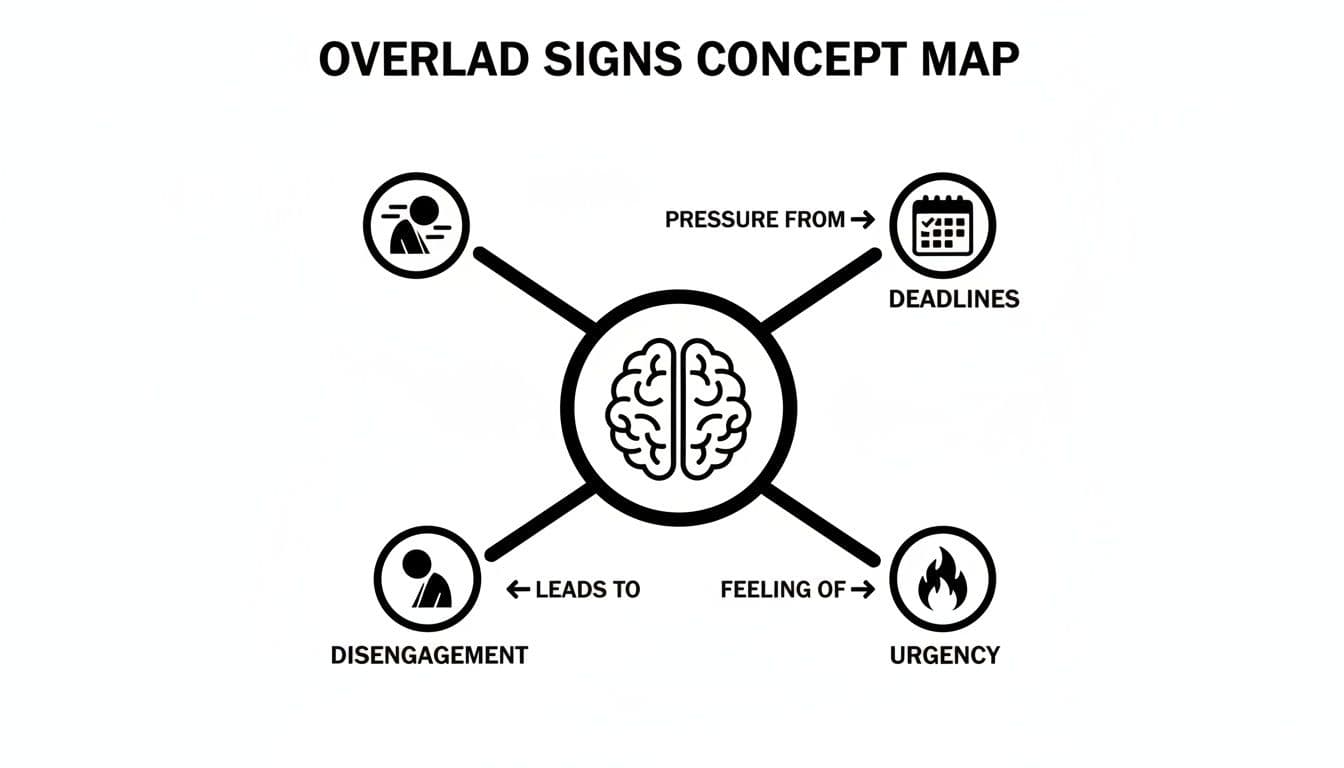
As you can see, the false sense of urgency and constant pressure from deadlines are core symptoms of information overload that ultimately cause teams to check out.
A Tale of Two Teams: A Before-and-After Scenario
To really see the impact, let’s compare two teams handling the exact same project update meeting.
Team A (The Old Way): Sarah, the project manager, tries to lead the discussion while frantically typing notes. After the meeting, she spends 30 minutes trying to decipher her messy notes and draft a recap email. A week later, a developer asks about a specific technical decision. No one can remember the details, so they waste another 20 minutes scrubbing through the video recording to find the answer. The team is constantly chasing information they already have but can't find.
Team B (The AI-Powered Way): This team uses an AI meeting assistant. The entire meeting is transcribed in real-time. Immediately after the call, everyone gets an automated email with:
- A bulleted summary of the key discussion points.
- A clean list of action items, already assigned.
- A link to the fully searchable transcript.
A week later, when that same developer has a question, he just searches the transcript for "database migration" and gets his answer in under a minute. The team saves time, kills ambiguity, and stays aligned without any extra effort.
Reclaiming Time and Focus with Intelligent Tools
This isn’t just about making life easier; it's a genuine strategic advantage. By automating the grunt work of note-taking and follow-ups, AI tools give back hours of valuable time every single week. That reclaimed time can be put back into deep work, strategic planning, and creative problem-solving—the very things information overload squeezes out.
And it's not just about managing internal chatter. Applying strong social listening practices helps teams filter external noise from social media, which is another major source of overload. Both internal and external filters are critical.
By turning meetings from a source of data chaos into a source of clear intelligence, these tools help teams become more agile, aligned, and effective. They create a single source of truth that cuts down on redundant questions, minimizes misunderstandings, and ensures valuable insights never get lost in the shuffle again. It's one of the most direct and impactful ways to fight back against information overload in the modern workplace.
How to Choose the Right AI Tool for Your Team
Picking an AI meeting assistant is more than just buying another piece of software. It’s a strategic move to fight information overload where it starts. The market is packed with options, all promising to bring back focus and clarity. The trick is to look past the shiny features and zero in on what will actually make a difference for your team.
Think of it like choosing a vehicle. A two-seater sports car is fun, but it’s useless for a construction crew that needs to haul equipment. In the same way, a tool built for a solo consultant probably won't have the security or integration power a large sales team needs. The goal is to find what fits your workflow, not just the one with the longest feature list.
Start by getting brutally honest about your team's biggest meeting headaches. Are action items getting lost after client calls? Are team members in different time zones struggling to keep up? Is industry jargon getting mangled in the notes? Pinpointing these specific problems is the first step to finding the right solution.
Core Evaluation Criteria
When you start comparing tools, there are a few things that are absolutely non-negotiable. These are the fundamentals that separate a genuinely helpful assistant from just another frustrating app.
- Transcription Accuracy: The whole point of these tools hinges on how well they capture what was said. You need a tool with a high accuracy rate that can handle your industry's specific jargon, different accents, and even when people talk over each other. If you have to constantly correct the transcript, it's just creating more work.
- Integration Capabilities: A tool that doesn’t connect to your other systems is just another silo of information. The best ones plug right into the software you already use every day—your CRM like Salesforce, project management tools like Asana or Jira, and chat platforms like Slack. This makes sure meeting insights go where they need to go, automatically.
- Enterprise-Grade Security: Meetings are often where your most sensitive information is discussed—client data, strategic plans, you name it. Make sure any tool you consider has serious security credentials, like SOC 2 compliance and GDPR adherence. Data encryption should be a given.
Matching Features to Team Needs
Once you've confirmed the basics are covered, it's time to match the features to your team's day-to-day reality. Not every team needs every bell and whistle, and focusing on what matters most keeps you from paying for things you’ll never use.
So, which profile sounds most like your team?
- For Sales and Revenue Teams: CRM integration is everything. The tool should be able to log meeting notes, summaries, and action items directly into the right contact or deal in your CRM. This kills manual data entry and keeps your pipeline updated with the latest intel from every call.
- For Global and Remote Teams: Multi-language support is a must-have. Look for a tool that can accurately transcribe and even translate conversations in all the languages your team and clients speak. It’s a simple way to break down communication barriers and make sure everyone is on the same page.
- For Project and Product Teams: Project management integration is the priority. The magic happens when a spoken action item from a meeting can be turned into a task in Trello or a ticket in Jira with just a click. This closes the gap between talking about work and actually getting it done.