Taking good notes during a meeting is about creating a clear, factual record of what was discussed, what was decided, and who is doing what next. This isn't about writing down every single word. It’s about capturing the essence of the conversation so everyone stays on the same page and knows their responsibilities.
Why Great Minute Taking Is Your Team's Secret Weapon
Let's be real—most people see meeting minutes as a boring administrative task. You type them up, email them out, and they disappear into a folder, never to be looked at again. But that's a huge missed opportunity. When done well, meeting minutes aren't just a record; they're a powerful tool that brings clarity to projects, holds people accountable, and stops the dreaded "I thought you were doing that" confusion.
When meetings aren't documented properly, they become a quiet killer of productivity and team morale. Projects stall, priorities get muddled, and you end up in follow-up meetings just to figure out what was decided in the first place. This isn't just a feeling; it has a massive financial impact.
The Real Cost of Unproductive Meetings
How we spend our time in meetings has shifted quite a bit. The average meeting time dropped to 14.8 hours per week in 2024, down from its peak during the pandemic. Still, a whopping 83% of employees spend up to a third of their workweek in meetings. When those meetings don't have a clear record of what was accomplished, their value tanks, costing U.S. companies an estimated $399 billion a year in lost time.
Shifting From Chore to Strategy
This guide is all about reframing how you think about taking minutes. We're moving away from the "chore" mindset and into a more strategic one. You’ll learn how to transform messy, rambling discussions into crisp, actionable plans that your team can actually use. For anyone looking to make their team more effective, this is a must-have skill.
If you really want to get this down and understand all the moving parts, check out resources like a practical guide to taking minutes of meeting.
By adopting a modern approach to minute-taking—one that combines old-school principles with smarter workflows—you can make sure every meeting actually moves the needle. It's not just another appointment on the calendar.
This approach helps you:
- Establish Clear Accountability: Every task gets an owner and a deadline. No more guesswork.
- Improve Project Momentum: Teams can quickly look up decisions and next steps, which keeps work from stalling.
- Enhance Team Alignment: A shared, accurate record ensures everyone is on the same page, even people who couldn't make it to the meeting.
Setting the Stage Before the Meeting Starts
Anyone who’s taken minutes knows the real work starts long before the meeting does. If you walk in cold, you’re already behind. Exceptional minutes don't just happen; they're the result of smart prep work that turns you from a stenographer into someone who actually understands the point of the meeting.
Without that groundwork, you're just scrambling to keep up. Good preparation means getting all the basic information out of the way so you can focus on the actual conversation, not on figuring out who’s who or why you're all there.
Sync With the Meeting Host
First things first: have a quick chat with the person who called the meeting. This isn't just a courtesy; it's a crucial step to make sure you’re both on the same page. Your goal is to get inside their head and understand the why behind the meeting, which will tell you exactly what to focus on.
A few pointed questions can make all the difference:
- What’s the main goal here? Are we trying to brainstorm, make a hard decision, get a status update, or solve a specific problem?
- What does a win look like? Knowing the ideal outcome helps you spot the important decisions and action items as they happen.
- Any sensitive topics I should be aware of? This gives you a heads-up to handle certain discussions with extra care and precision.
Getting this context is everything. If it's a brainstorming session, you'll be capturing a wide net of ideas. But for a decision-making meeting, you’ll be zeroed in on the motions, votes, and final calls.
When documentation is sloppy, it creates a domino effect that can bring a whole project to a grinding halt.
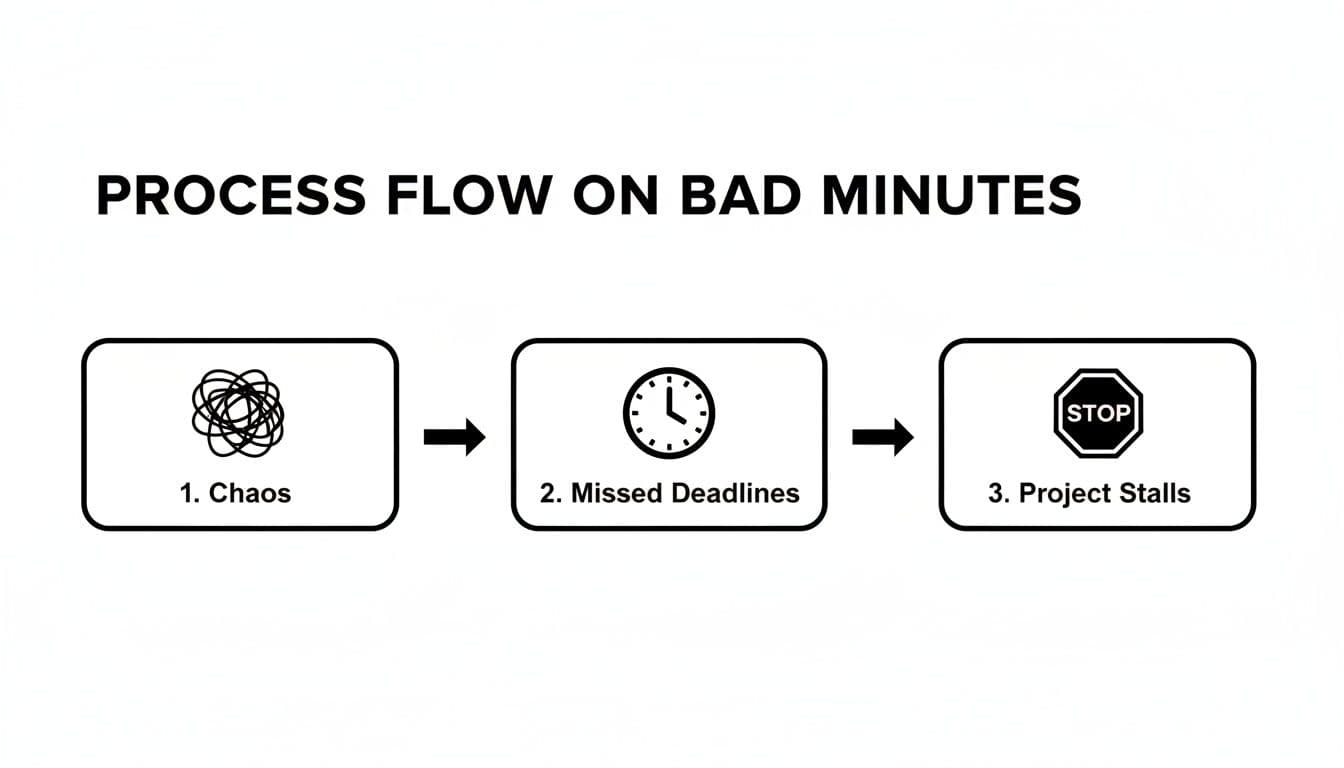
As you can see, unclear minutes create ripples of confusion that kill a team’s momentum.
Build a Smart Template
Never, ever start with a blank page. It's the fastest way to feel overwhelmed. A template is your secret weapon. By filling out all the known details beforehand, you free up your brainpower to actually listen to what's being said. A recent survey found that while 86% of meetings have minutes, only 54% of people follow up on the action items. A good template can help close that gap.
Here’s what to put in your template before the meeting starts:
- Meeting Title, Date, and Time: Get the basics down.
- Attendee List: List everyone invited. During the meeting, you can simply check off who's there.
- Meeting Objectives: A quick, one-sentence summary of the goal you got from the meeting host.
- Agenda Items: Copy the official agenda straight into your document. This creates the skeleton you'll flesh out with your notes.
Once the meeting kicks off, your job is simply to fill in the blanks next to each agenda item. This proactive approach is the difference between capturing everything and missing the one critical detail that matters most. For more tips on keeping the meeting itself on track, take a look at this guide on how to run effective meetings. When you set the stage properly, you’re not just ready to take notes—you’re setting the entire meeting up for success.
Capturing What Truly Matters During the Discussion
Once the meeting kicks off, the real work begins. A common mistake I see people make is trying to transcribe every single word. That’s a fast track to burnout, and frankly, nobody has the time to read a novel-length summary.
Your job isn't to be a court reporter; it's to be a filter. You need to zero in on the outcomes, not the winding conversational paths we all take to get there.
The trick is to shift your focus from capturing the process of the conversation to documenting the results. This really boils down to three things: decisions made, action items assigned, and any key takeaways that give important context. Everything else is just chatter.

Differentiating Between Discussion and Decision
Learning to separate the debate from the final call is probably the most valuable skill you can develop as a minute-taker. A team might spend fifteen minutes passionately debating three different marketing strategies. Trying to capture every pro and con is a waste of everyone's time.
What really matters is the final choice.
Your notes should cut right to the chase, something like this:
That one sentence is worth more than three pages of debate. It tells anyone who wasn't there exactly what they need to know. It’s clear, concise, and actionable.
Adopting a Note-Taking Style That Works for You
There's no single "right" way to take notes. The best method is whatever helps you keep up without getting lost in the weeds. The goal is always speed and clarity, so don’t be afraid to try a few different approaches.
Here are a few methods that I’ve seen work really well:
- The Quadrant Method: Split your page into four boxes: General Notes, Decisions, Action Items, and Questions. This forces you to categorize information as you hear it, keeping things organized from the get-go.
- The Outline Method: Use the meeting agenda as your skeleton. Each agenda item is a main bullet, and you simply indent notes, decisions, and action items underneath it.
- Mind Mapping: For brainstorming or more creative sessions, a mind map is fantastic. You can visually connect ideas as they pop up, branching out from the central topic.
No matter what style you land on, developing your own shorthand is a game-changer. Simple things like using "AI" for Action Item or a star symbol for a key decision can seriously boost your speed.
The Art of Capturing Action Items on the Fly
An action item without an owner and a deadline is just a wish. This is one of the most critical parts of your job—nailing down these commitments the moment they're made.
When you hear a task being assigned, an internal alarm should go off. You need to immediately jot down three things:
- The specific task: What exactly needs to be done?
- The owner: Who is responsible? Get a specific name, not just "the marketing team."
- The deadline: When is it due? A real date, not "next week."
For example, instead of writing "look into the budget," capture it as: "Action Item: Sarah to finalize the Q4 marketing budget and share with the team by Friday, October 26th." There's no ambiguity there. If you want to dive deeper, our guide on how to take better meeting notes has some great frameworks.
Knowing When to Politely Interrupt
Let’s be clear: accuracy is everything. If you’re even slightly unsure about a decision or the specifics of an action item, you have to speak up. It can feel awkward to interrupt, but it’s far better than sending out inaccurate minutes that cause confusion down the line.
You don't have to bring the meeting to a screeching halt. Just wait for a natural pause and jump in with a quick, clarifying question.
This simple act shows you're on top of things and reinforces to the team that the minutes are a reliable source of truth.
This kind of clarity is more important than ever. While the most common meeting length is 30 minutes, research shows that when more than 10 people are in a meeting, 64% of them run longer than an hour. Attention spans plummet after that 30-minute mark, making a crystal-clear record essential for keeping everyone on the same page. To see more on this, check out some recent meeting statistics research. Your notes are the team's best defense against information overload.
Turning Raw Notes Into a Clear Action Plan
The meeting’s over, but your job isn’t. That jumble of raw notes on your screen—full of shorthand and half-formed thoughts—is just the starting point. The real magic happens when you transform that mess into a clean, professional document that actually gets things done.
This is the part where you move beyond simply recording what happened. You’re crafting a clear, strategic summary of the outcomes that anyone, even someone who wasn't there, can pick up and understand instantly.
Editing for Clarity and Brevity
It’s time to put on your editor’s hat. Go through your notes with one goal: cut anything that doesn't document a key decision or a required action. Be ruthless.
Here’s what that looks like in practice:
- Translate your own code. All those personal abbreviations and shortcuts need to be written out in plain English. What made perfect sense to you in the heat of the moment will look like gibberish to your colleagues.
- Cut the fluff. Get rid of the conversational filler, the sidebars, and the points that were repeated three times. You're not writing a script; you're summarizing the essentials.
- Ditch the jargon. Swap out overly technical terms and acronyms for simpler language. Your minutes should be accessible to everyone, not just the subject matter experts.
Think of your raw notes as the first draft. Now you’re editing it down to only the most critical plot points.
Structuring Your Minutes for Readability
Nobody wants to read a wall of text. The structure of your final document is just as important as the words themselves, because it helps busy people find exactly what they need, fast.
The simplest way to keep things organized is to follow the meeting agenda. Use clear headings for each topic, then write a concise summary of the discussion and the outcome.
For instance, under a heading like "Q4 Marketing Budget Review," you could use a quick bulleted list for the key discussion points and then a bolded sentence to state the final decision. It makes the outcome impossible to miss.
Highlighting Key Decisions and Action Items
While the whole summary is useful, the decisions made and the action items assigned are what push work forward. They need to stand out, not be buried in a paragraph.
I always recommend creating a dedicated section just for action items, either at the top or bottom of the minutes. A simple table is the cleanest way to do this.
| Action Item | Owner | Deadline |
|---|---|---|
| Finalize Q4 marketing budget | Sarah L. | October 26 |
| Draft client proposal | Mark R. | October 29 |
| Schedule project kickoff | David C. | November 1 |
This format gives everyone an at-a-glance view of who is doing what and by when. It kills ambiguity and makes follow-up a breeze. For a deeper look at getting this right, check out our guide on clarifying https://summarizemeeting.com/en/faq/action-items-from-meetings. And once you have a clear plan, it's crucial that everyone stays aligned; a great next step is to learn how to share task lists in Google Tasks and Gmail.
This small step of making tasks visible and distinct has a huge impact. A recent survey found that while 86% of meetings generate minutes, only 54% of people say the action items are actually followed up on. A clear, structured action plan is what closes that gap. Polishing your notes isn't about making them pretty—it’s about making them work.
Let's be honest: taking minutes can feel like a frantic scramble to type everything while trying to actually participate in the conversation. It’s time to work smarter, not harder. This is where AI tools can be a lifesaver, but maybe not in the way you think.
Think of an AI tool like Otter.ai or Fireflies.ai as your co-pilot, not the pilot. It’s there to handle the heavy lifting—the tedious, word-for-word transcription—so you can focus on the bigger picture: the decisions, the nuances, and the strategic direction of the discussion.
Your job shifts from being a high-speed typist to a sharp editor. The AI gives you the raw clay, and you mold it into something meaningful.
Where AI Shines and Where It Stumbles
AI tools are incredible at capturing every single word spoken. For complex technical meetings or rapid-fire brainstorming sessions, having a complete, searchable transcript is a game-changer. Nothing gets lost in the shuffle.
But let's be realistic—AI is far from flawless. It has zero understanding of human subtext. Sarcasm, inside jokes, a hesitant tone, or a critical eye-roll are completely lost on an algorithm. It can also get tripped up by industry jargon or get confused when people talk over each other.
Relying solely on an AI-generated summary without a human sanity check is asking for trouble. It can easily lead to misinterpretations and inaccurate records that cause more problems than they solve.